Although file-level monitoring is relatively new in terms of security, identifying changes to file data is not a recent requirement. For years, programmers on IBM i have used various techniques to compare source files when looking for variations in application source code. Life-cycle management software alleviated much of the manual effort involved in keeping track of multiple iterations of source code. But there are many companies without access to this type of solution. They continue to rely on simple content comparison to determine the differences that exist in multiple iterations of a program’s source code.
Merriam-Webster defines integrity as the “firm adherence to a code of especially moral or artistic values: incorruptibility.” To accomplish integrity, we have to establish procedures and employ controls so that a server—and its data—do not become corrupted. Monitoring practices have to evolve to encompass configuration controls and application data in order to ensure that only approved changes are taking place.
There are two basic approaches to file integrity monitoring:
- Baseline comparison
- Real-time change notification
Regardless of which technique is utilized, file integrity monitoring should provide an organization with visibility to:
- Which user initiated the change
- What application or function made the change
- When the change was made
- The before and after value of the change
- Whether the change was authorized
Why Monitor File Integrity?
Security controls are designed and deployed in an effort to ensure that server and application data access is given only to users with demonstrable need. However, experts advise that no single security layer or control should ever be considered impenetrable. Being proactive about monitoring a server provides an additional safety net that alerts an organization to unapproved—and possibly illicit—activity.
Many organizations struggle to accurately assess the scope of a breach. The task is simplified if the server maintains a log of user access. Being able to identify and prove that an unauthorized user saw only a small subset of a large database can have an enormous impact on the required response.
Modern regulatory standards often call for monitoring of “critical files” so that unauthorized changes can be detected. Although far from an exhaustive list, three examples of commonly encountered auditing or regulatory standards that require an FIM initiative are described in the following tables.
| PCI DSS 3.2: Payment Card Industry Data Security Standard | |
|---|---|
| Secure audit trails so they cannot be altered (10.5.5) | Use file integrity monitoring or change-detection software on logs to ensure that existing log data cannot be changed without generating alerts (although new data being added should not cause an alert). |
| Regularly test security systems and processes (11.5) | Deploy file integrity monitoring software to alert personnel to unauthorized modification of critical system files, configuration files, or content files; and configure the software to perform critical file comparisons at least weekly. |
| NIST SP 800-53: Security Controls for Federal Information Systems and Organizations | |
|---|---|
| Information System Backup (CP-9) | The organization conducts backups of user- and system level information and protects the confidentiality and integrity of the backup information. |
| Information System Monitoring (SI-4) | Deploys monitoring devices: (i) strategically within the information system to collect organization-determined essential information; and (ii) at ad hoc locations within the system to track specific types of transactions of interest to the organization. |
| Software and Information Integrity (SI-7) | The information system detects unauthorized changes to software and information. |
| HIPAA: Security Standards for the Protection of Electronic PHI | |
|---|---|
| Technical Safeguards (45 CFR 164.312) | (c) (1) Implement policies and procedures to protect electronic protected health information from improper alteration or destruction. (c) (2) Implement electronic mechanisms to corroborate that electronic protected health information has not been altered or destroyed in an unauthorized manner. |
What File Integrity Monitoring Means to IBM Power Systems Running IBM i
IBM Power Systems servers are uniquely capable of hosting numerous operating systems, including IBM i, AIX, and Linux, as well as applications that run outside the confines of the legacy QSYS.LIB and QDLS file systems. Applications include WebSphere, Lotus Domino, and Apache web servers. These operating systems and applications may execute with different file integrity monitoring requirements. As such, this discussion is focused on native IBM i.
Despite the inclusion of a comprehensive, built-in security infrastructure, IBM i security controls often remain unconfigured.1 Comprehensive monitoring can easily be undermined by an overall weak security configuration. As such, common shortcomings should be addressed to "harden" the overall security environment. Experts recommend that security should be employed using a defense-in-layers strategy, and the operating system controls should provide the foundation upon which other tools and functions are built.
It's important that the server is configured to support the concept of integrity protection. If the overall security level of the server (QSECURITY) is below IBM's minimum recommended value of 40, if users have excessive authority, or if *PUBLIC carries the shipped default authority of *CHANGE to application libraries, it will be possible to detect—but difficult to prevent—configuration changes. If the necessary steps are taken, IBM i conforms to the Controlled Access Protection Profile (CAPP) which replaced the Trusted Computing Systems Evaluation Criteria (TCSEC) C2 evaluation requirements, for which previous versions and releases of OS/400 qualified.
File integrity monitoring is implemented primarily in response to a regulatory requirement as real-time (continuous) monitoring is a relatively new concept for most IBM i installations. Fortunately, the capability to detect changes to the system configuration and database files exists within the base operating system, and commercial security applications are available to ensure that critical events are escalated to concerned parties.
The IBM i operating system relies far less on configuration files than other operating systems, such as Windows and Linux. Instead, many configuration settings are established through a special facility called system values. There are more than one hundred and fifty system values within IBM i v7.3 and most of these should be actively monitored for unauthorized modification.
The primary intent of file integrity monitoring is to detect unauthorized configuration changes. As such, on IBM i, the discussion may, more appropriately, be termed simply "integrity monitoring."
1According to the annual State of IBM i Security Study
Operating System Integrity
Digital signatures protect the Licensed Program Products (LPPs), the Operating System, and the Firmware. Using the CHKOBJITG (Check Object Integrity) command, an administrator can interrogate any application program, OS program, or Licensed Internal Code (LIC) executable to see if has been modified. If user code tries to access control blocks designated for use only by the LIC, the hardware throws an exception, the Licensed Internal Code throws an error to the user code and, of course, access is denied. Operating System Integrity
A major concern for audit and security personnel is the risk that a server's operating system will become corrupted through accidental means or malicious intent. Contrary to popular belief, it is possible—and relatively easy—for a powerful user to damage IBM i and render the server unusable until a reload of the OS is performed from bootable media.
As a responsible security organization, we are not going to document additional instructions on these techniques in case they might be used by a malicious person. We will, however, discuss considerations for preventing abuse of the operating system.
Object Integrity
Servers running at QSECURITY level of 40 or 50 enforce object integrity to prevent direct object access, which means addressing the object's internals directly via pointers.
At these security levels, user applications are required to use system interfaces (commands and APIs) to gain access to system objects. In addition, several key integrity controls are employed, including:
- Authority Checking, enforced by the system interface
- Parameter Validation
- Object Domain Checking
- Hardware Storage Protection (HSP)
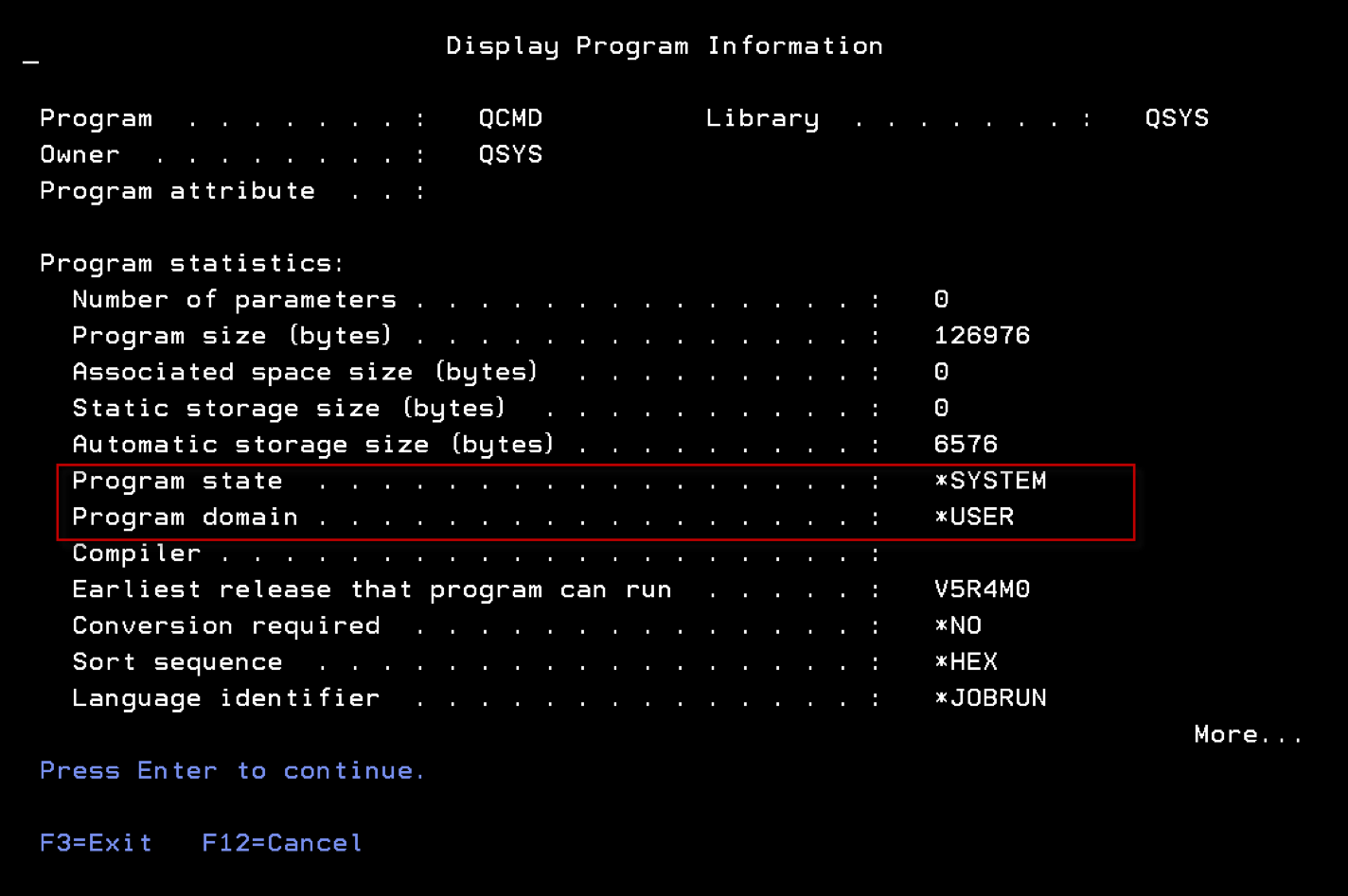
Under IBM i, every object has a "domain" and every program has a "state." These attributes can be viewed using the DSPPGM and DSPOBJD commands respectively and control how the object can be accessed. The display of a program will look similar to Figure 1. Programs running in the *SYSTEM state can directly access objects in both *USER and *SYSTEM domains; programs running in the *USER state can only access *USER domain objects.
Hardware Storage Protection (HSP) is a powerful integrity feature that's built in—and enforced by—the Power hardware. In order to fully understand the protection provided by HSP, a deep understanding of IBM i infrastructure is necessary and is beyond the scope of this paper. In simple terms, HSP polices the interaction between elements above and below the Machine Interface (MI).
Digital signatures protect the Licensed Program Products (LPPs), the Operating System, and the Firmware. Using the CHKOBJITG (Check Object Integrity) command, an administrator can interrogate any application program, OS program, or Licensed Internal Code (LIC) executable to see if has been modified. If user code tries to access control blocks designated for use only by the LIC, the hardware throws an exception, the Licensed Internal Code throws an error to the user code and, of course, access is denied.
Event Log Integrity
Most regulatory standards mandate that important events must be logged. The intent is for the logs to provide irrefutable proof regarding important activities that have occurred on the server. Due to their forensic nature, these logs typically have to be monitored to ensure that event records are never modified or removed. Most standards permit new event records to be written without generating an alert.
IBM i contains a unique tamper-proof repository (QAUDJRN) that's designed specifically to log system and user activities. Single entries cannot be removed or altered regardless of the authority of the user. It is, however, possible for event records to be deleted en masse via the deletion of an entire audit journal receiver, or for the operating system's event auditing function to be "turned off." For this reason, there are several important recommendations regarding how IBM i auditing should be configured and managed:
Specific Library to Contain Audit Information
The default library for audit journal receivers is QGPL, which is shipped by IBM but is considered a user library as it changes frequently. This non-dedicated library can represent a challenge during housekeeping tasks or system migrations. QGPL ships with *PUBLIC authority of *CHANGE which permits access by any user. It's recommended that audit journal receivers be located in a dedicated library that's secured from the general user population.
Remove *AUDIT Special Authority from Users
Users with *ALLOBJ and *AUDIT special authority have the potential to configure what types of events and users are audited. They can also turn the auditing function on and off. If the organization supports a separate auditor role, then *AUDIT authority should be removed from any other user. It should be noted that users that possess *ALLOBJ can potentially grant themselves *AUDIT special authority.
Control Access to Auditing-Related Commands
There are numerous commands that can impact the integrity of IBM i's auditing function and should be secured. As a powerful supplemental layer, Powertech Command Security for IBM i (PTCS) can prevent abuse by standard and powerful users (for example, users with *ALLOBJ special authority) using flexible, rule-based restrictions.
Many commands should be considered as candidates for lockdown, although this is difficult to do against powerful users without a solution such as Command Security. The commands listed below pertain only to the auditing function and are not guaranteed to be the only commands that could compromise the integrity of the auditing repository.
The following commands are shipped with PUBLIC(*USE) and require that the user have authority to the objects impacted by the delete operation. They require no special authority and should be secured from abuse by all users:
DLTLIB Delete Library
DLTJRNRCV Delete Journal Receiver
The following command is shipped with PUBLIC(*EXCLUDE) and requires that the user have access to the command, the QAUDJRN audit journal, and the old and new receivers. It requires no special authority and should be secured from abuse by powerful users:
CHGJRN Change Journal
The following commands are shipped with PUBLIC(*USE) and require that the user possess *AUDIT special authority. They should be secured from abuse by powerful users:
CHGUSRAUD Change User Auditing
CHGOBJAUD Change Object Auditing
CHGAUD Change Auditing (IFS)
The following command is shipped with PUBLIC(*EXCLUDE) and requires that the user have access to the command, plus *AUDIT special authority in order to change the QAUDxxx system values. It should be secured from abuse by powerful users:
CHGSYSVAL Change System Value
The following command requires that the user have *ALLOBJ and *AUDIT special authorities. It should be secured from abuse by powerful users:
CHGSECAUD Change Security Auditing
The audit function included within IBM i doesn’t typically encompass activities that originate from the network (e.g. FTP or ODBC). This is an important consideration and is discussed in the section entitled "Network Access."
For more detailed information on IBM i auditing, refer to the guide entitled Security Auditing in the Real World.
System Values
As previously mentioned, the IBM i operating system determines many of its configuration settings through a mechanism called System Values. Although not all system values are considered critical to security, the majority should be protected and monitored for changes.
Baseline Verification
System values should be compared against a policy baseline on a regular basis. Exceptions between the baseline and actual values should be reported immediately, the cause determined, and then made compliant as soon as feasibly possible. This comparison can be performed manually from a printed list, or using a purpose-built auditing solution such as Powertech Compliance Monitor for IBM i.
Monitor For Changes Logged To QAUDJRN
Baseline comparisons work well for a point-in-time validation. However, there remains a risk that a program or user could change a system value and subsequently change it back before non-compliance can be detected by a baseline validation. In addition to baseline verification, it's strongly recommended that auditing be configured to include *SECURITY events, and the event log be reviewed for "SV" entries indicating that a system value was altered.
To automate this process, Powertech provides two powerful solutions: Compliance Monitor is designed to search on any event logged within QAUDJRN and generate easy-to-read forensic reports of the results; Powertech SIEM Agent for IBM i can monitor QAUDJRN for the arrival of a logged event, and escalate a notification in real-time to a message queue, ISS console, or SIEM (syslog) solution.
Prevent Unauthorized Change Using Powertech Command Security
Command Security is a command line monitoring solution. It controls how and when a command can be executed through a powerful combination of selective conditions and associated actions. As an exit program solution, it's even effective against powerful users—a set of users that were previously considered unstoppable. Although it's capable of monitoring any command, in the current context it should be configured to monitor the CHGSYSVAL command.
Lock Down Via SST
IBM i permits a subset of system values to be locked in order to prevent alteration by any user. This restriction was provided to eliminate the risk of programs or users changing system values without permission, and is performed inside the confinement of System Service Tools (SST) to encompass users with *ALLOBJ special authority. Unlike Command Security, this capability is all-or-nothing; but is still recommended as it provides an additional layer of security. The list of "lockable" system values for the installed operating system release can be found in the help text of the CHGSYSVAL command.
Anti-Virus
No discussion about operating system integrity would be complete without covering the ongoing challenge of viruses and malicious code. Unlike other popular operating systems, IBM i's unique infrastructure is highly virus-resistant. This is partly due to the fact that it's not possible to change an object from one type to another. In Windows, for example, an object's type is based upon its filename extension. This means you can simply rename a file to change its type—for example making an executable appear to be a .pdf document. This type of object manipulation is not possible in IBM i due to protection provided by HSP.
Viral infection typically entails the virus embedding—and hiding—executable code inside other objects. IBM i object binaries cannot be modified without recreating the object, and cannot masquerade as anything but their original object type. This prevents the initial infection and spread of viral code.
Other file systems remain vulnerable to viral infection and should be monitored using a commercial anti-virus solution, such as Powertech Antivirus for IBM i. Powered by McAfee, Powertech Antivirus is a native IBM i solution that is fully integrated with the operating system's own anti-virus enablement features. This solution provides scheduled, on-demand, and open/close scanning of files stored in the Integrated File System (IFS), as well as Lotus Domino databases, AIX, and Linux. All normal anti-virus capabilities are available, including the download of up-to-date virus signatures from McAfee and infected object quarantine and cleansing.
It should be noted that malicious code can be written for IBM i, just as it can on any server. A program that performs a Power Down System (PWRDWNSYS) command could be configured as the servers "start up" program and cause a frustrating and costly cycle of power up and power down events. Although technically not a virus, this is definitely malware and good security practices—such as monitoring and protecting system values—should be utilized to reduce this risk.
Configuration Files
Although much of the operating system configuration is handled via system values, database files do exist that contain elements of system configuration. Generally, these system files are secured from users. However, the proliferation of users with powerful administrative rights like *ALLOBJ in many organizations makes these objects vulnerable.
It is critical that user authorities be closely guarded, and access by privileged users be monitored using a combination of profile and object auditing. Powertech Authority Broker for IBM i manages the temporary assignment of administrator privileges and the monitoring of powerful users, and can reduce the risk associated with system access by these users.
Some examples of files that should not be directly accessed include:
Library QSYS (or iASP equivalent):
QADB* 			- registry of all physical files, logical files,
			SQL tables, views, indexes, packages, and aliases.
QADBXRDBD 		- registry and configuration for accessing
			remote databases.

Library QSYS (or iASP equivalent):
QADB* 			- registry of all physical files, logical files,
			SQL tables, views,indexes, packages, and aliases.
QADBXRDBD 		- registry and configuration for accessing remote
			databases.

Library QSYS2 (or iASP equivalent):
SYSROUTINES 		- registry of all user-defined routines
			(functions & procedures)
SYSROUTDEP 		- registry of all routine dependencies
SYSPARMS 		- registry of all routine parameters
SYSSEQOBJECTS 		- registry of all sequence objects
SYSTYPES 		- registry of all user-defined types
SYSVARIABLES 		- registry of all global variables
SYSVARIABLEDEP 		- registry of all global variable dependencies
SYSIXADV 		- index advice table
SQL_FEATURES 		- SQL standard list of supported features
SQL_LANGUAGES 		- SQL standard list of supported languages
SQL_SIZING 		- SQL standard list of database limits
SYSJARCONTENTS 		- registry of classes related to Java routines
SYSJAROBJECTS 		- registry of jarids related to Java routines
SYSTEXT* 		- registry of Omnifind configuration
XSR* 			- registry of all XML schemas (XSROBJECTS)

Library QRECOVERY (or iASP equivalent):
QDBAL* 			- ALTER TABLE status files
QDBIX* 			- Create index build status files
QDBRG* 			- Reorganize status files
QDBTI* 			- Omnifind text index build status files
QADBERAP 		- Asynchronuos index rebuild (EDTRBDAP equivalent)
QSQ901S - SQL -901 LogApplication Integrity
If your organization stores data in DB2 files, then there's a good chance that much of that information is considered "critical" to the application that maintains it and the business unit that owns it.
The objective of File Integrity Monitoring within the application layer is to ensure that critical data is only accessed by authorized users through approved applications, thereby assuring its availability and accuracy.
Powerful users, such as administrators and programmers, usually have access to production data. Regulatory compliance often demands that this be revoked to prevent unauthorized activities, or accidental mishaps. Even though not directly related to FIM, user management solutions should be evaluated to ensure consistent profile configuration, and to audit and control user access to production data. Powertech's Identity Manager for IBM i and Powertech Authority Broker for IBM i solutions were designed specifically to address these requirements and satisfy compliance regulations.
The IBM i operating system contains several mechanisms to support the concept of FIM, although they weren't specifically designed for security integrity monitoring and do not exhibit all of the characteristics of a modern FIM solution. They do, however, provide the necessary foundation for application developers and commercial providers to build FIM solutions.
Journaling
IBM i includes an integrated DB2 database with the ability to capture changes made to database objects. This function is known as journaling, and it can track the before and after image of a database record. Originally used for recovery purposes, it is commonly used for high availability replication, and can also be used to generate an audit trail.
As with the security audit journal, the data collected by the database journaling function is stored in journal receivers, which are simply containers much like a structureless file.
There are two main considerations when journaling is used for non-audit purposes (for example for high availability replication or application recovery) versus FIM.
Retention
The retention requirement for audit journal data is typically longer than for non-audit data. After a data change has been safely written to the disk, or replicated successfully to a high availability system—two common uses for journaling—, there is no further use for the journal data. High availability applications are often configured to purge the journal information after 24 hours. However, some regulatory standards call for change data to be retained for 12 months, sometimes longer.
Before and After Images
Journaling can be configured to capture the record's original ("before") data and the changed ("after") data. With non-audit journaling, only the changed data may be required, however with audit journaling for FIM we would typically want to capture and store the before and after images.
The main technical challenge with journaling for the purpose of auditing is that the captured data is unformatted, rendering manual analysis difficult and extremely time consuming. There are no columns to parse the data and no key fields to sort it. There are also no search capabilities, reporting, or alerting functions. After a change is made to the data, the journal receiver contents must be displayed and manually analyzed to determine if the change was authorized. Unfortunately, this process is not conducive to the timely discovery of illicit activity, allowing a perpetrator plenty of time to complete their activities.
Journaling is capable of recording events that impact data—add, update, delete—but not the viewing of a data record. In some cases, simply viewing the data could be construed as a breach and should be monitored. For example, perhaps payroll or medical information should only be displayed within the confines of the approved application. Depending on the sensitivity of the data, being able to determine the type and scope of a breach can prove highly valuable and this functionality should be provided by a read-capable monitoring technique, such as triggers.
Despite these limitations, journaling remains the recommended approach to audit database changes. Enhancing its functionality to detect activities in real-time, to differentiate between irregular and normal business activity, and escalate the notification of violations yields significant Return On Security Investment (ROSI).
Organizations don't typically benefit from notification of every single event in a large file. Criteria must be specified to indicate the normal source of those events, which of the fields are critical, and the acceptable range of data values. This enables the business to determine if a change is a normal business transaction made via an approved application. Reducing the number of false or unimportant alerts prevents the over-notification that typical leads to complacency and overlooking when an unauthorized event does occur.
The following table lists examples of data events that may require selective handling.
| Database Event | Audit Desired |
|---|---|
| Customer name changes via Maintenance Application | NO |
| Customer A/R Balance changes (by more than $100,000) | YES |
| Salary increases by more than 10% (via maintenance application) | YES |
| Salary increases by more than 10% (via DFU) | YES + ALERT |
| Deletion of an Accounts Payable Record | YES |
The benefit of reacting selectively extends beyond security to enable raised awareness to the presence of any database issue, including inventory errors and accounting inaccuracies.
Many customers have found success using Powertech's Database Monitor for IBM i. Originally written for the highly-regulated pharmaceutical industry, this solution complements IBM i journaling with selective auditing, notification, and logging capabilities. If a database is already journaled for other purposes, such as high availability, the existing journal receivers can be used.
Once configured, Data Thread diligently observes file activity for data events that are outside the bounds of normal business activities, based on rules specified within the product. Database Monitor monitors selective changes in a single field, or logs every data event that impacts the entire file.
Journal commands should be audited and controlled using command line restrictions, object access, and a modern command monitoring solution like Powertech's Command Security. Journal-related commands should be restricted—especially when used against audit-journal receivers. Some examples include:
STRJRNPF Start Journaling Physical File
ENDJRNPF End Journaling Physical File
Other commands, such as DLTJRNRCV and CHGJRN should be controlled as already described under Event Log Integrity.
Triggers
A trigger is a database function within DB2 that permits an application program to be invoked during various database operations. There are four trigger events that can be used to monitor a file for:
- INSERT
- CHANGE
- DELETE
- READ
Using the Add Physical File Trigger (ADDPPFTRG) command, triggers can be set to "fire" before or after the activity on the file has occurred.
Triggers are able to provide similar functionality to database journaling by accessing the before and after image of a database record, although performance is often a consideration due to the overhead of program invocation. Trigger programs should be carefully tested to establish the impact on application performance when added.
Journaling is designed to capture and store database record images; however, the functionality of a trigger program is controlled by the programmer that writes it. A trigger program receives information about a data event. Depending on the type of event, this may include the before and after image of the record. This can then be acted upon in any manner, including storing the before and after image in a log or even overriding the data before it is written to disk.
There are disadvantages to using triggers for audit purposes, not least of which is that every trigger program has to be written. Many auditors frown upon the conflict of interest in self-policing when an organization's own programmers are involved in building the monitoring controls. Building, testing, and maintaining security applications with the necessary robust functionality is not a priority for most I.T. departments—especially when there are commercial solutions available.
However, unlike journaling, a trigger is able to detect a database READ event. This means that it has visibility to a user who is simply viewing data. This can be beneficial for highly sensitive data, although the trigger will fire for all read activities and therefore, without complex programming, may have limited ability to determine and notify administrators of unauthorized events. Triggers may cause performance degradation in an application, and should generally be reserved for monitoring files that don’t experience large volumes of data access.
Several trigger commands exist that should be audited and controlled using command line restrictions, object access, and a modern command monitoring solution like Command Security. Some examples include:
ADDPFTRG Add Physical File Trigger
RMVPFTRG Change Physical File Trigger
CHGPFTRG Remove Physical File Trigger
As previously discussed, triggers simply invoke a user-written program. The associated trigger program is capable of performing any task defined by the programmer. Counter measures should be taken to ensure that unauthorized triggers are not being deployed that might impact the integrity or privacy of the database. The Print Physical File Trigger (PRTPFTRG) command should be used on a regular basis to determine the existence and legitimacy of authorized trigger programs on critical files.
Database Monitor is able to leverage and extend DB2's trigger functionality to monitor database activities—including read activities. Trigger programs are automatically generated by Data Thread, and selective filtering capabilities enable critical fields to be monitored and recorded. Email notification is built in to the product, removing the requirement for manual integration of a messaging solution into the trigger program. An electronic signature function enforces accountability by tying a database event to a user. This is accomplished by requiring the user to supply their password and a descriptive reason when a sensitive database function is performed.
Compare Physical File
The Compare Physical File Member (CMPPFM) command is a simple and effective technique for monitoring a file by using baseline validation. Despite its original inception as a programmer's tool for source code comparison, benefit can be derived from using it to monitor the integrity of small, minimally active database files.
Obviously, baseline validation requires establishing a baseline for comparison. This can be accomplished by generating a backup copy of the file at various intervals. The backup location should be secured using object security and Command Security to protect it from powerful users. Intervals should be time-based (e.g. daily or monthly) depending on the fluidity of the data, as well as after any authorized change. Organizations may maintain multiple iterations of the baseline as it changes over time.
To validate the file, issue the CMPPFM command and specify the current file name and location in conjunction with the backup file's name and location. Validation should be performed on a regular basis to ensure that changes are discovered in a timely fashion.
A summary of changes can be performed using the *FILE option, although a details report should be reviewed to determine the nature of any discrepancy. The report can be generated to a spooled file, or to a database file. Automation is possible by generating the results to an output file and using a program or a query to analyze the results to determine if there is a match in the data. A programmatic approach also provides the potential for notification and alerting when a variance is discovered. If the file contains packed decimal data, then the output file option will provide more meaningful viewing of that data.
Unfortunately, there are limitations to using the CMPPFM command for application database files. These limitations include a 10,000 row restriction, slow performance, and the fact that the information generated on variances can be difficult to interpret. As such, it's recommended that application database files be monitored in real-time and baseline validation be reserved for more static files such as application configuration files and source code.
High-Level Language Program
Baseline validation is possible using an application program written in a native high-level language, such as RPG or COBOL. The capture of the baseline is performed using the same technique as CMPPFM.
Comparison of record data can be done by reading a record from the primary file—sequentially or via a unique key—and retrieving and comparing the matching record contents from the secondary file. This will typically result in a fast analysis, although the actual variances in the data record won't be reported as easily as they are with CMPPFM.
Unlike CMPPFM, this technique has no limitation on the number of records it can process and is therefore more suited to larger files. It does, however, require the generation of the program to perform the analysis. Using internally-described file definitions and file overrides, knowledgeable programmers should be able to write one program that supports many different files.
QUERY
IBM's Query remains a popular product for basic database reporting. Query is able to process a primary file and then determine if there is a corresponding record in a secondary file. Locating variances in record data generally requires defining field comparisons (for example, T01.SALARY <> T02.SALARY) and typically requires a unique query for each file needing to be monitored.
More powerful Query-like products are available from Fortra such as Sequel, which provide far more powerful functions than the original base Query/400 licensed program product.
Object Auditing
In addition to system event auditing, the IBM i operating system supports object-level auditing. Entries are written into the tamper-proof audit journal based on object, user, and system configuration. Once auditing is active on a file, entries are generated with a "ZR" and "ZC" for read and changed respectively.
Object auditing does not fully satisfy FIM requirements as it provides no visibility to data events. Activated using the Change Object Auditing (CHGOBJAUD) command, entries are generated on object activities but not the data within. It is, however, a legitimate addition to other FIM controls as it assists with building a detailed picture of the accesses made against critical files.
Entries should be extracted and reported upon. IBM provides the Copy Audit Journal Entry (CPYAUDJRNE) command for this purpose. A separate extract file is generated for each entry type requested, and these files can be queried or processed programmatically. Notification functionality should be developed to ensure timely awareness of access made to critical files.
Powertech's Compliance Monitor solution includes the capability to parse and filter any audit journal entry, including the ZC and ZR entries generated by object auditing. Reports can be generated on demand, or via a batch schedule and results distributed via e-mail to interested parties. Compliance Monitor is able to interrogate and combine audit information from multiple IBM i-based servers into a single, consolidated report.
Due to the time-sensitive nature of audit entries, real-time event notification should be considered. Powertech SIEM Agent provides escalation of critical system messages as well as events logged in the security audit journal by the IBM i auditing function and by other Powertech products. Notifications can be relayed to a message queue, ISS console, or SIEM (syslog) server.
For more detailed information on IBM i auditing, refer to the guide Security Auditing in the Real World.
Database Open Exit Point
The QIBM_DB_OPEN exit point is a mechanism that detects when a file has been opened and invokes a user-written application program. This exit point is designed to alleviate the parsing of complex SQL statements and to provide the exit program with a list of files referenced by the SQL.
Prior to IBM i v7.1, the exit program was invoked for every full open and performance can be a concern. The exit point was enhanced in v7.1 to support a selective capability so that the exit program is only invoked for files that have object auditing turned on. This may alleviate much of the overhead. It should be noted that some high availability (HA) applications utilize object auditing to detect changes to objects, and therefore would cause the exit program to be called frequently.
DB2 Field Procedures
Another option available starting with IBM i v7.1 is known as a "field proc." This facility permits a developer to register an ILE program at a field level that's invoked when a record is written or read. That program can perform a function on a sensitive field. Most discussion surrounding this feature pertains to field encryption that is transparent to the application, but some organizations may find some validity in using it for FIM. Compared to other monitoring options it's more complex and provides less value, so will not be referenced further.
Network Access
IBM i supports powerful TCP functionality, including File Transfer Protocol (FTP), Open Database Connectivity (ODBC), and Remote Command services. The addition of these services exposed the fact that many databases are not secured at an object level and rely on application and menu security to separate users from critical data. Unfortunately, many interfaces circumvent these legacy controls and expose files and programs directly. In addition, some TCP services provide the ability to execute commands—sometimes in contravention to a profile's "limit capability" setting.
Network transactions typically have no audit trail. If a user downloads a file (assuming they are permitted access to the file object) using FTP or ODBC, there's no log of the data transfer. This contravenes virtually every regulatory standard, and exposes IBM i servers to transparent data leaks.
Network Exit Points
IBM i includes a facility called exit points to reduce the risk posed by network access. These exit points permit the registration of user-written programs that are invoked to perform ancillary functions prior to the execution of the user's request. Exit programs associated with the network exit points are able to return a pass/fail flag indicating to the TCP server whether the user's request should be denied, or passed on for processing.
Unfortunately, many organizations continue to ignore the fact that these methods of access exist, and that they may provide users with the ability to view, change, and even delete data. Some interfaces allow commands to be executed that could impact both operating system and application integrity.
An exit program should be registered for any exit point that permits data access or command execution. The exit program should have two basic functions:
Access control
A network exit program is a software firewall, and should supplement any object security that has been configured. Although object security still reigns supreme, exit programs can provide flexibility not found in the operating systems own object security mechanism.
Event Auditing
The IBM i operating system provides no visibility to many operations performed through the TCP services, so the exit program should be leveraged to generate the missing audit trail.
Exit Point Manager is a commercial-grade exit program solution that easily satisfies these requirements with advanced features such as transaction and object rules, profile switching, and simple rule configuration.
Several exit point commands exist that should be audited and controlled using command line restrictions, object access, and a modern command monitoring solution like Command Security. Some examples include:
ADDEXITPGM Add Exit Program
RMVEXITPGM Remove Exit Program
WRKREGINF Work With Registry Information
Conclusion
File Integrity Monitoring is a key element of regulatory compliance, as well as an important component of any organization's overall security strategy. To be successful, FIM on IBM i requires strong configuration of system security controls in conjunction with the deployment of file and configuration monitoring solutions.
When configured correctly, IBM Power Systems servers running IBM i exhibit world-class integrity features, both within the Power hardware as well as the IBM i operating system. By utilizing these capabilities, an organization is assured of a solid foundation upon which monitoring solutions can be deployed.
Application data monitoring can be performed based on event-based changes or simple baseline validation. These techniques can offer visibility to user access and modification of critical information.
Powertech security solutions are designed to complement IBM i's own integrity controls; to leverage and extend the functions available in the operating system, and to provide visibility to unauthorized changes to critical elements. These solutions significantly reduce or remove the burden of manual oversight, providing the timeliness and visibility demanded by regulatory compliance.
The success of FIM can be measured by the time lag between the occurrence of an unauthorized event and its detection and notification to an administrator. In fact, a well-executed FIM strategy can make the difference between a breach and an attempted breach.
Let's Get Started
Find out how secure your systems are with a free check of your security configuration. Request your Security Scan today.