Organizations around the world are waking up to the business impact of lax cybersecurity: unexpected downtime, lost productivity, resources tied up in lawsuits, and data breach notifications.
That was evident this year, when 64% of IBM i pros surveyed ranked cybersecurity as a top concern in this year’s IBM i Marketplace Survey.
The latest State of IBM i Security Study – now in its 23rd year – reveals concrete, impartial data about how IBM i systems are protected and where the gaps remain.
Executive Summary
For the 23rd year, this study provides compelling insight into the security posture of 163 IBM i server partitions – systems that are used to host business-critical applications, and that often house electronic Personal Health Information (ePHI), financial data, and personally identifiable information (PII).
This is generally not a recurring study of the same systems each year, but overall trends are apparent. Cybersecurity is becoming a higher priority for participating organizations, and in recent years businesses have made gradual improvements with malware protection and password controls.
2026: IBM i Security Strengthens Despite Some Areas of Regression
Overall, IBM i organizations have continued the trend that we’ve seen over the past few years: Cybersecurity concern is being converted into action. The community is clearly making an effort to improve their security posture, however, there are a few key areas where regression is slowing this progress.
The Most Significant Trends This Year:
Improved Use of Recommended Values for Restoring Objects
System Values for restoring objects are designed to prevent the restoration of malicious or tampered objects. However, IBM i’s default settings fail to provide this protection. Fortunately, IBM i shops are realizing this danger and are working diligently to configure these values to run at or above recommended levels.
Minimum Password Length Settings Climb
Extending minimum password length is a potent security mandate and can pay dividends in mitigating risks associated with compromised credentials and password-guessing. PCI-DSS 4.0 requires a minimum of 12 characters, and this year, the number of IBM i shops that met that minimum more than quadrupled.
Presence of Inactive Profiles Increases
Inactive profiles, especially those with elevated administrative authorities, pose a significant security risk due to the possibility that they could be hijacked and used by threat actors. The best way to combat this is to minimize the number of inactive profiles on any given system. This year’s spike in inactive, enabled profiles is troubling and needs to be remediated going forward.
Invalid Sign-On Attempts Surge
Without the proper controls in place, attackers could have unlimited attempts to guess a user’s password. Increases in invalid sign on attempts against a single profile, including multiple systems that had profiles with millions of invalid attempts, indicate that IBM i shops must do a better job of not only establishing a maximum number of attempts and an effective corresponding action, but also proactively monitoring for high volumes of invalid sign on attempts and addressing them quickly.
Looking Beyond 2026
For the third year in a row, the results of this study indicate an overall improved security posture across the pool of participants. We hope organizations continue to seize this momentum by not only identifying and addressing current weaknesses, but also regularly assessing and refining their security posture to account for the ever-changing nature of the cybersecurity landscape.
About This Study
Trends in IBM i Security
Cyberthreats grow more sophisticated every year, raising the importance of proper security controls. The State of IBM i Security Study has historically proven that many organizations rely on system settings that leave data vulnerable.
But in recent years, Fortra has observed an encouraging trend: organizations large and small increasingly prioritize IBM i security.
A deeper understanding of the risks and the security controls built into the OS is currently driving a wave of interest in IBM i cybersecurity issues.
Why This Study Matters to You
The 23rd annual State of IBM i Security Study strives to help you understand common IBM i security exposures and how to correct them quickly and effectively.
Your IBM i server likely runs mission-critical business applications. But because Windows and UNIX platforms often require more resources, it’s easy to let IBM i security projects take a back seat.
The weaknesses identified and documented in this study are caused by poor or missing configurations that can – and should – be corrected. This study illustrates the most common and dangerous IBM i security exposures and offers tips for improvement.
Methodology
The data shared in this study is collected by Fortra security experts reviewing IBM i systems using our proprietary Powertech Security Scan and Risk Assessor tools. The Powertech Security Scan is free software that runs directly from any network-attached PC without modifying systems settings, interrogating Power servers running IBM i (System i, iSeries, AS/400) across seven critical areas. The Powertech Risk Assessor tool evaluates these seven critical areas of IBM i security configurations as well as many others.
The areas of IBM i security covered in this study include:
- Server-level security controls
- Profile and password settings
- Administrative capabilities
- Network-initiated commands and data access
- Public accessibility to corporate data
- System event auditing
- Virus scanning
This year’s study includes 163 IBM i servers and partitions that were audited throughout 2025. The average system scanned for this study has 1,897 users and 572 libraries. Ninety-six percent of scanned servers are running on version 7.4 or 7.5 of IBM i, while 4% are running on an unsupported version of the OS (7.3 and below.) Surprisingly, there were no systems in the study running OS 7.6, which was released in Q2 2025.
Security Enforcement Level: QSECURITY
IBM i security best practices start with the configuration of numerous system values, which regulate how easy or difficult it is for someone to use or abuse your system. Poorly configured or unmonitored system values are an unacceptable security risk.
QSECURITY Level
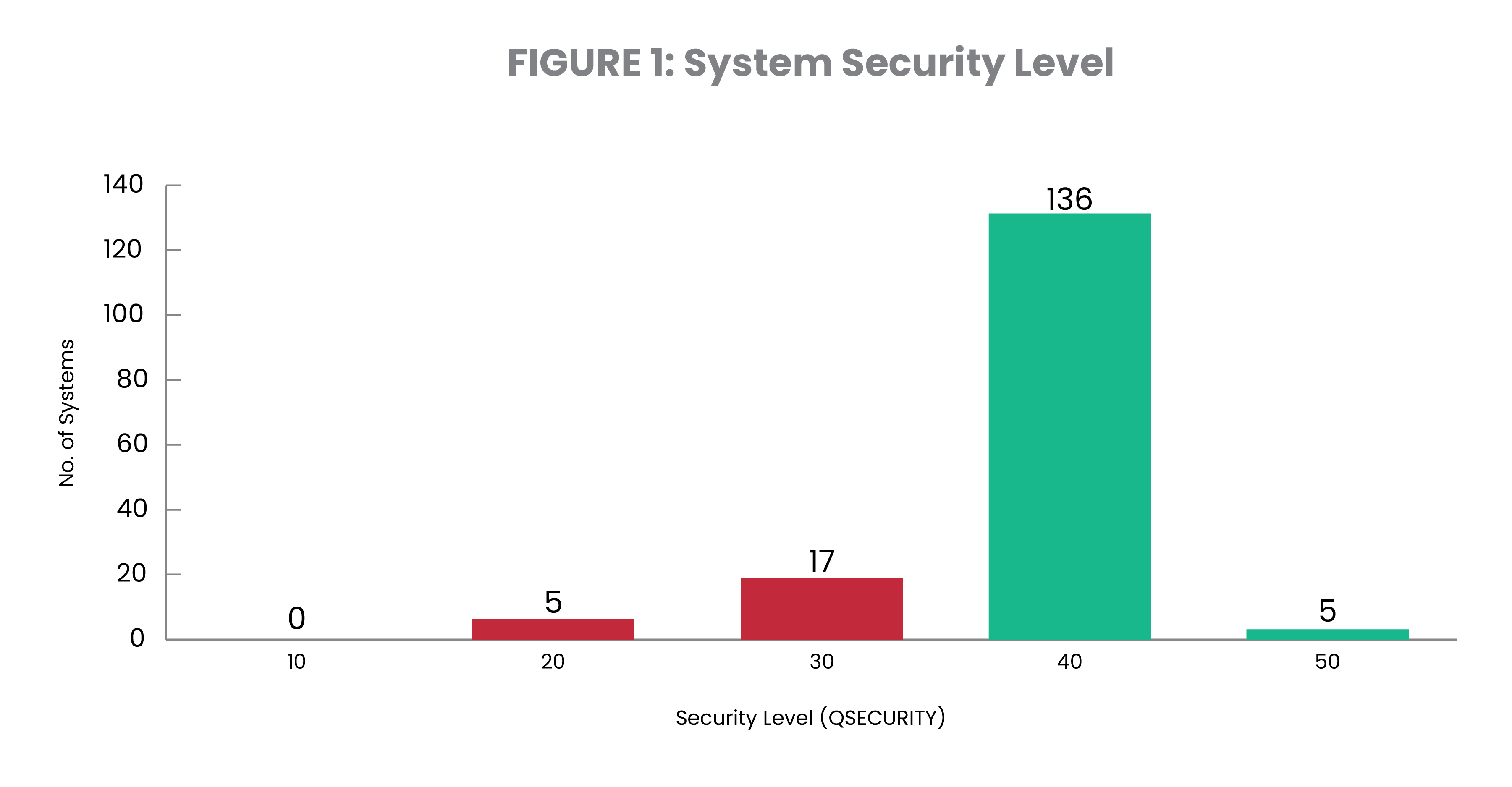
The system security level (QSECURITY) sets the overall tone, although it is often undermined by other settings. IBM recommends and ships security level 40 as the minimum, due to a documented vulnerability found in level 30 and below. It should be noted that, despite the revision of the default setting, a server migration will typically reload this to the same value as found on the previous generation of the server. In 7.5, IBM has restricted the use of security level 20 to an in-place upgrade only, and cannot be back leveled.
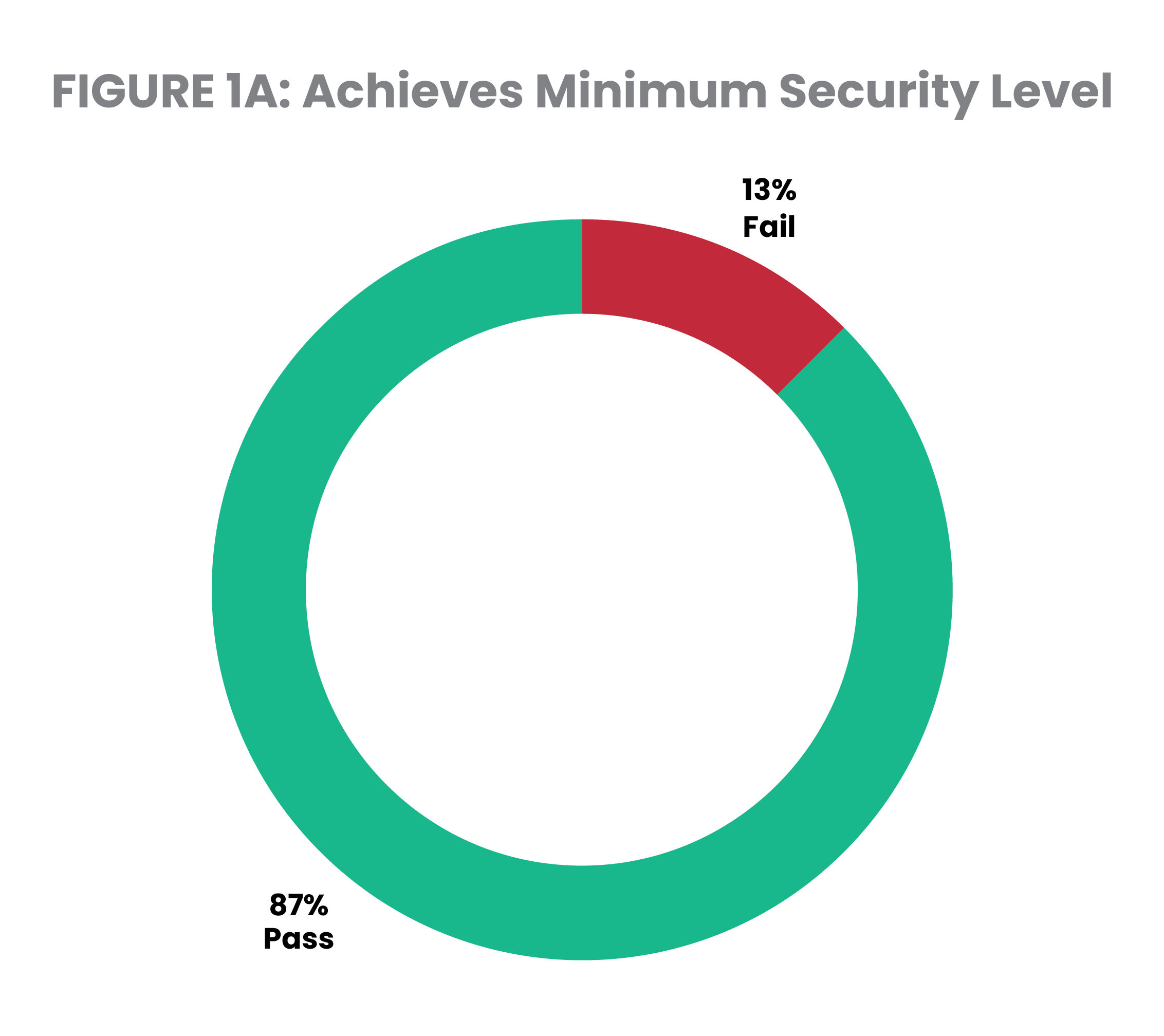
Figure 1 shows the distribution of security settings on the systems included in the 2026 dataset. Out of the 154 systems studied, 10% are running at system security level 30 and 3% are running at security level 20. Overall, 13% fall short of IBM’s recommended minimum level (Figure 1A). This is fairly consistent with the 12% of systems that fell short in 2025. Many running on a sub-par security level are doing so without deliberate intent after having migrated their system values from an older server.
PRO TIP
Bring your system up to QSECURITY level 40 or higher. Leveraging the experience of IBM i security professionals like the team at Fortra is a way to quickly eliminate all the guesswork from the process. Fortra’s security professionals can move your security levels from 20 to 40 or from 30 to 40.
Basic System Security: Key Values for Restoring Objects
Several other system values related to object restoration often remain at their shipped levels, reflecting a typical IBM i configuration of “load and go.”
The system values in question are designed to work together as a tri-pass filter that prevents restoration of malicious or tampered objects. But IBM i’s default values fail to provide this protection, which may leave the system vulnerable.
The system values below work consecutively to determine if an object should be restored, or if it is to be converted during the restore:
- Verify Object on Restore (QVFYOBJRST)—Sixty-one percent of servers are running below the recommended level of 3.
- This value, preset at level 1, controls whether a signature will be validated when a digitally signed object is restored.
- Force Conversion on Restore (QFRCCVNRST)—Seventy-nine percent of servers are running below the recommended level of 3.
- This value, preset at level 1, controls whether certain types of objects are converted during a restore.
- Allow Object Restore (QALWOBJRST)—Sixty-four percent of servers have altered this system value from its default *ALL setting to a more secure setting.
- This value controls whether programs with certain security attributes, such as system-state and authority adoption, can be restored.
System values set at the recommended level for Verify Object on Restore and Force Conversion on Restore both improved slightly while the number of systems that met recommended levels for Allow Object Restore more than quadrupled — demonstrating a strong, positive trend towards heightened security within restore processes.
PRO TIP
A proactive approach to system values starts with defining and implementing a security policy that incorporates the most secure settings your environment will tolerate. (Seek professional expertise if you are unsure of the impact of certain settings.) The free open source IBM i Security Standard from Fortra can help you get started with defining your own policy.
Users with Powerful Authorities
IT professionals require special authorities to manage servers. These can also permit the ability to view or change financial applications, customer credit card data, and confidential employee files. In careless, misguided, or malicious hands, a user with special authorities can cause serious damage.
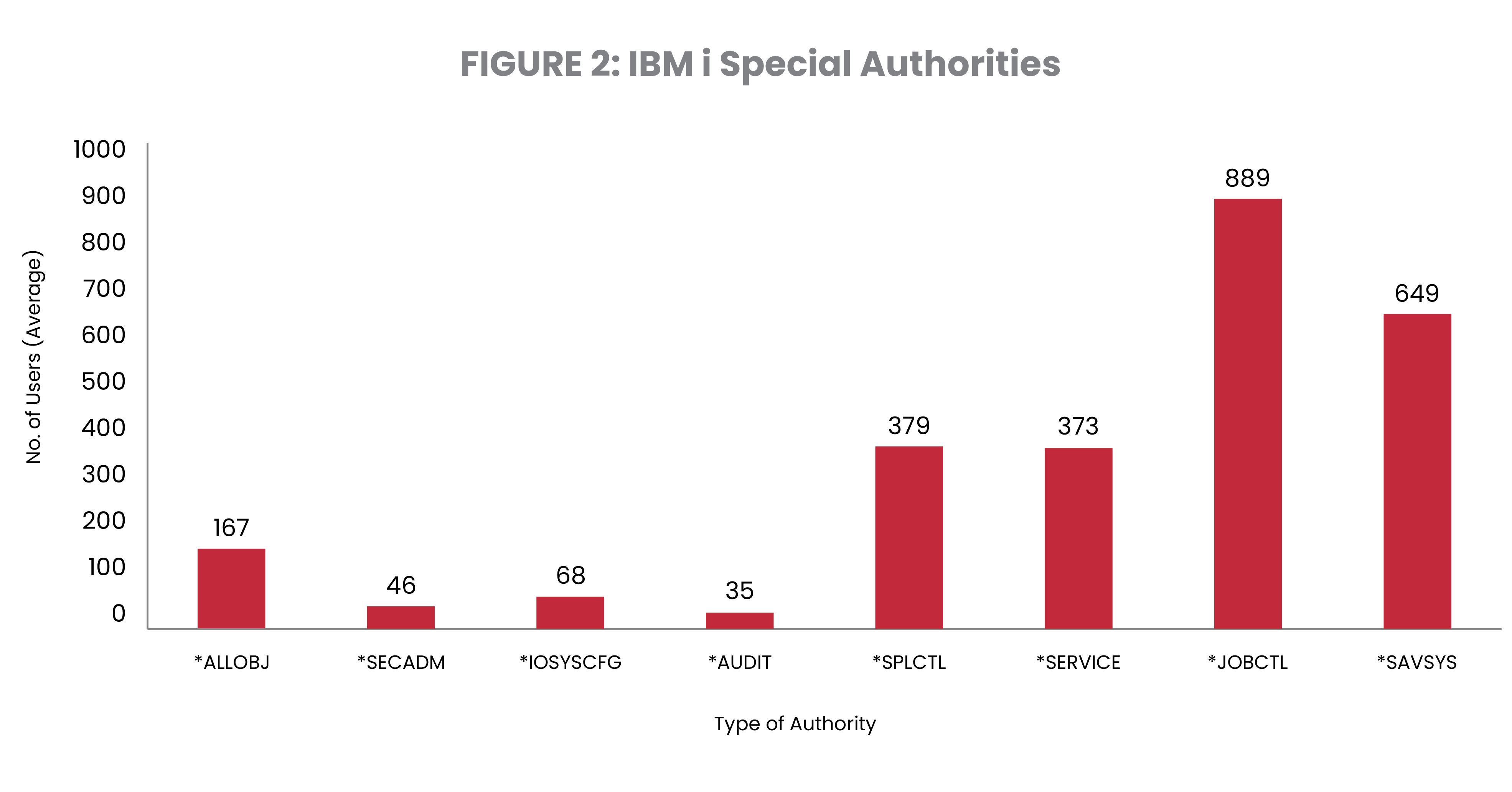
IBM i special authorities are administrative privileges and always pose a security risk, so auditors require you to limit the users who have these special authorities and carefully monitor and audit their use. Of the special authorities, *ALLOBJ is the one providing users with the unrestricted ability to view, change, and delete every file and program on the system. This is sometimes referred to as “root” authority. As shown in Figure 2, this authority is granted to users in unacceptably high numbers.
Only three systems have 10 or fewer users with *ALLOBJ authority. This year, 8% of users held *ALLOBJ, a decrease from 11% in 2025.
*JOBCTL and *SPLCTL are traditionally the most common special authorities. However, at 34%, the number of users that have been granted *SAVSYS is troubling. This special authority carries the potential to allow users to access data that they don’t have the authority for and should be limited whenever possible.
Job Control provides the capability to change the priority of jobs and printing, or even terminate subsystems in some cases while I/O System Configuration allows users to add or remove communications configuration information, work with TCP/IP servers, and configure the internet connection server (ICS).
PRO TIP
Keep the number of users with special authority to fewer than 10, or less than 3% of the user community. We recommend working with an IBM i security expert, who can advise on ways to determine if authorities are necessary and suggest possible alternatives in marginal cases. Here are some best practices for powerful users:
- Document and enforce separation of duties for powerful users.
- Avoid having any all-powerful users, all the time.
- Monitor, log, and report on the use of powerful authorities.
- Be prepared to justify the use of powerful authorities to auditors and managers.
Password and Profile Security: Inactive Profiles
Inactive profiles are user profiles that have not been used in the last 30 days or more. They create a security exposure because these accounts are not actively maintained by their users, which make them prime targets for hijacking.
Many of these inactive profiles belong to former employees or contractors—people who might carry a grudge or who might find their former employer’s data useful in their new role at a competitor.
The threat persists even if ex-employees never attempt to utilize these profiles. Other users within the organization might know, for example, that the former IT director’s profile is still on the system. And whether an inactive profile is exploited by a former employee, a malicious insider, or a hacker, unusual use of the profile won’t be detected and reported by the profile owner.
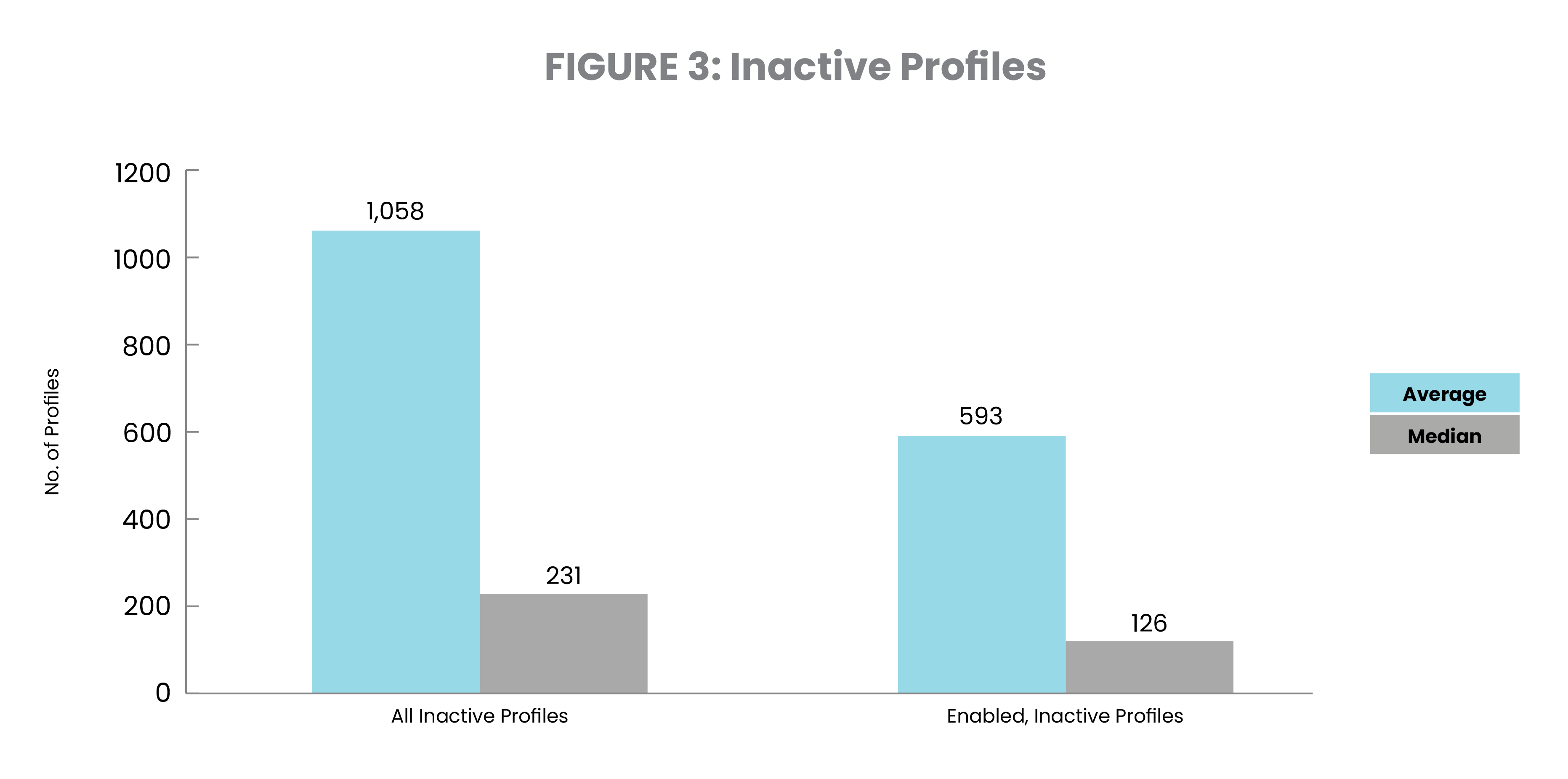
Figure 3 shows an average of 1,058 profiles (56% of the total) have not signed on in the past 30 days or more. Of these, 593 of them remain enabled and ready to be used. Both the total number of inactive profiles and the percentage of them that are enabled and ready to be used have increased dramatically. IBM i shops must move quickly to rectify both of these issues in the coming year.
PRO TIP
Establish a policy and process for managing inactive profiles. Start by defining how long a profile can be inactive before you take action (perhaps 60 days), disable those inactive profiles, and remove all special authorities and group profile assignments. Wait another 30 days to make sure the profile remains unused before removing it from the system, or until the name of the user is no longer required for reconciling with the audit trail. This process can be performed manually or automated using Powertech Policy Minder or IBM’s built-in security tools.
Password and Profile Security: Default Passwords
On IBM i, profiles that have a default password have a password that’s the same as the username. Hackers—or even your own employees— can guess profile names like jsmith and try default passwords.
Regulatory and legislative standards typically mandate that users utilize unique credentials known only to the user, ensuring that any actions can be tied to that specific individual. Organizations might struggle to prosecute illegal or unauthorized activity if it becomes evident that the credentials can't unequivocally identify the culprit.
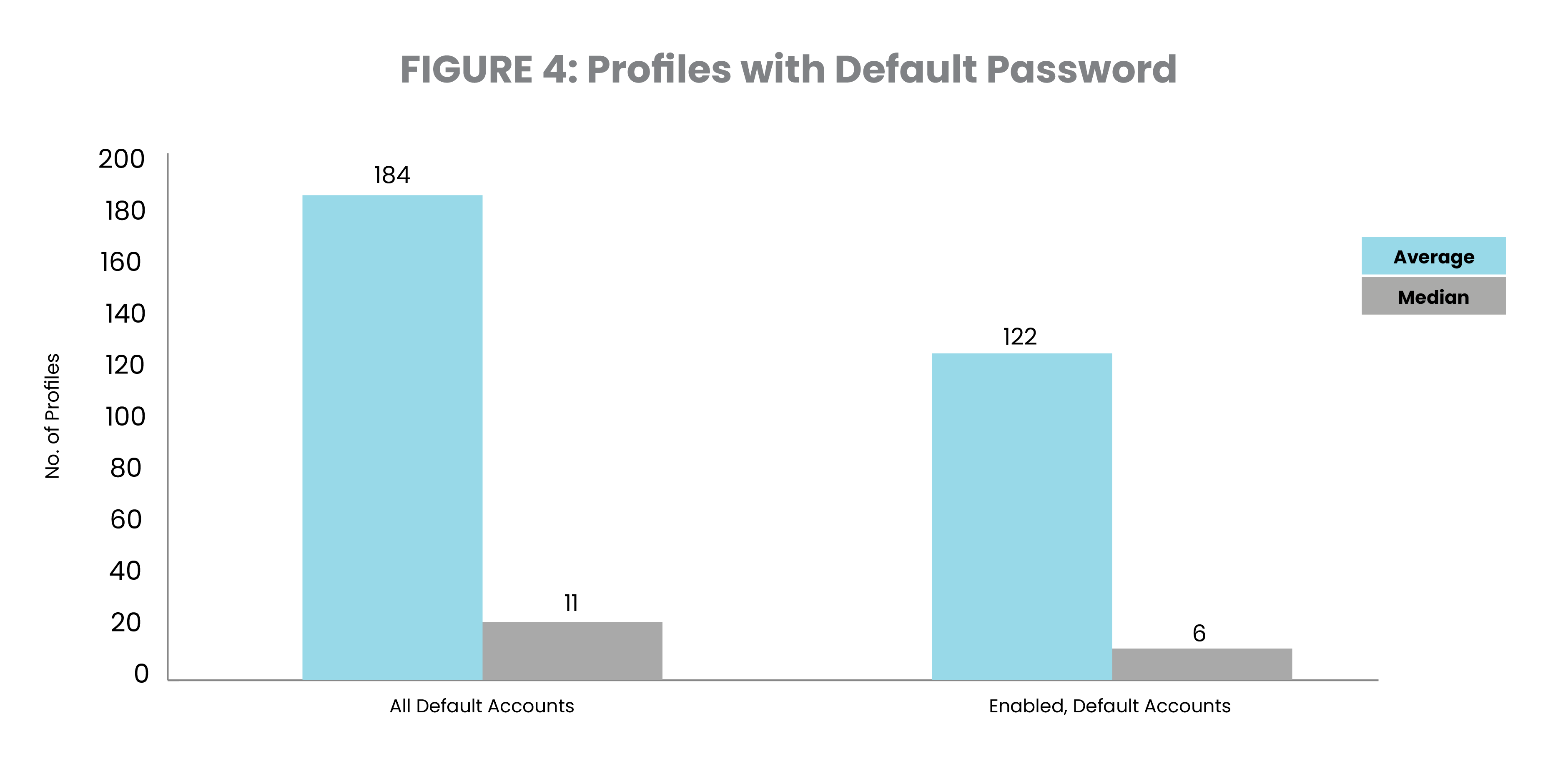
In this study, 10% of user profiles have default passwords (Figure 4). Thirty-one percent of the systems studied have more than 30 user profiles with default passwords. Fourteen percent are even worse off, with more than 100 users with default passwords. This year, we have 49 systems with 1,000 or more profiles with default passwords. One system has more than 11,000 user profiles with default passwords and nearly 80% of them are in an enabled state. Historically, we’ve seen a continued decline in the use of default passwords, but the data paints a different picture this year. Organizations need to strengthen their resolve to eradicate default passwords from their systems.
PRO TIP
Establish and enforce strong password policies. The QPWDRULES system value can ban default passwords, although consideration must be given to applications or vendor software that create profiles during installation.
Reporting tools like Powertech Compliance Monitor for IBM i make it easy to generate audit reports on a regular basis that compare IBM i user and password information against policy.
Password and Profile Security: Password Length
Shorter passwords may be easier to remember, but they’re also easier for others to guess. Although short passwords can be strengthened by using digits or special characters, the odds of correctly guessing a four-character password are greater than a longer password.
NIST now recommends using eight-character passwords, up from their previous recommendation of six characters.
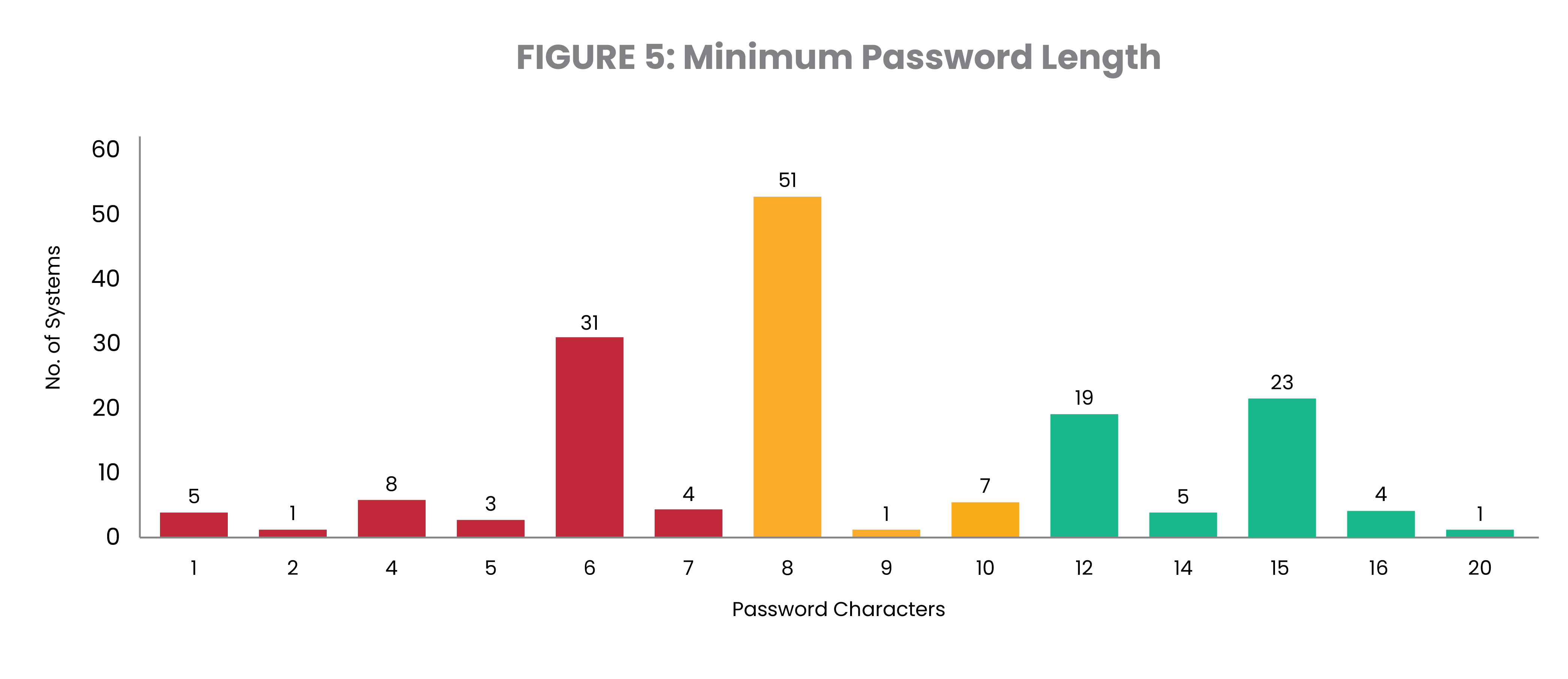
Figure 5 shows the setting for the minimum password value on the systems reviewed. This year, 32% of systems studied meet PCI DSS 4.0’s requirement of a 12-character minimum – a major improvement from the 8% that met the 12-character minimum in 2025. Although largely falling short of PCI compliance, the number of systems studied that surpassed eight characters rose to 68% in 2026.
Shockingly, 10% of systems permit users to select a password that is less than six characters long, while five servers permits the use of single character passwords.
PRO TIP
Create a password policy that requires users to use 12 or more characters in their passwords. Consider switching from passwords to passphrases, which are typically 20 to 30 characters long and make brute force attacks impractical.
Password and Profile Security: Other Password Settings
IBM i allows systems administrators to define password policy at a granular level. Password settings include length, character restrictions, digit requirement, expiration time, and how soon a password can be reused.
These settings help make passwords harder to guess and increase the protection of your system, since simple, easy-to-guess passwords like “123456” and “password” remain disturbingly common. Imagine what could happen if your users with simple passwords have special authorities or access to sensitive data.
The latest data shows that older, more basic password controls have become widely utilized. For example, 76% of systems require a digit in passwords and 82% require passwords to differ from previous versions of the password.
However, a more advanced system for password controls, known as QPWDRULES, is only being used by 31% of systems. QPWDRULES specifies a list of rules used to control whether a password is formed correctly, such as *REQANY3 which states that the password must contain characters from at least three of the following four types of characters: uppercase letters, lowercase letters, digits, and special characters. Adoption of QPWDRULES thereby enforces the widespread use of password best practices among users.
Although the increase in use of basic password controls is a positive trend, QPWDRULES should serve as the standard for healthy password policy going forward.
PRO TIP
Require passwords of at least 12 characters. IBM i can even support passwords up to 128 characters, which are more accurately called passphrases.
Multi-factor authentication can also protect your systems from unauthorized access. Another option is eliminating passwords entirely by implementing single sign-on (SSO) based on technology that is included in the IBM i operating system.
Password and Profile Security: Invalid Sign-On Attempts
Passwords are forgotten, mistyped, or simply mixed up with other passwords. Help desk personnel charged with resetting these passwords often work with the same users over and over. How do you track which users have multiple invalid sign-on attempts? What if your powerful profiles are targeted? Larger numbers could indicate an intrusion attempt, while single-digit attempts are probably the sign of a frustrated user.
Fifty-seven percent of systems have a profile that experienced more than 100 denied attempts. Thirty percent have more than 1,000 invalid sign-on attempts against a single profile. There were four systems with over one million invalid sign-on attempts for a single profile, including one with more than 5,300,000.
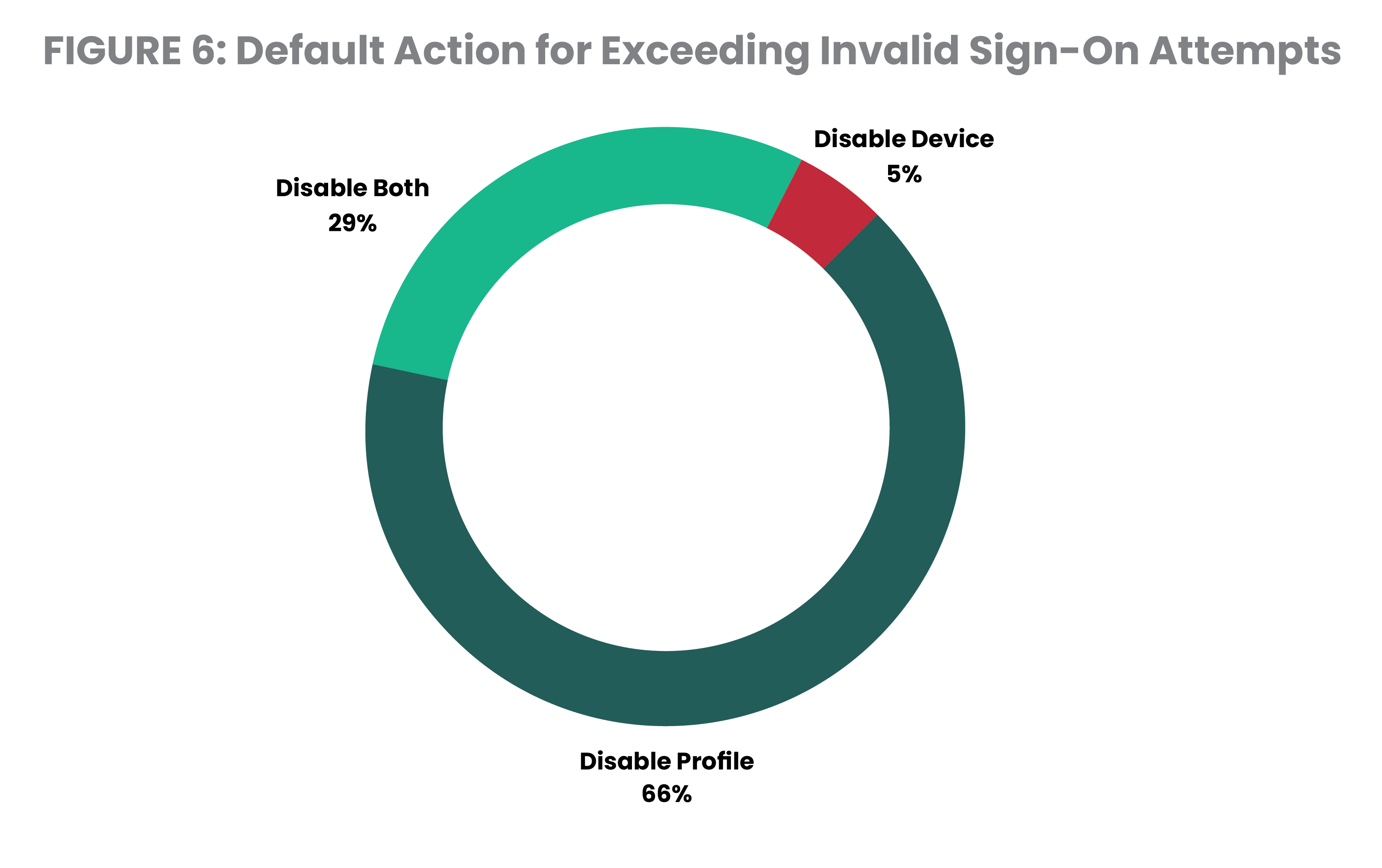
Figure 6 shows the action taken when the maximum number of allowed sign-on attempts is exceeded. In 95% of cases, the profile is disabled, which is the standard recommendation. When using explicitly named devices (as opposed to virtual device names), the recommendation is expanded to include disablement of the device description. It is not recommended to disable virtual devices, as the system typically creates a new device when the user reconnects. The device setting does not apply to all connections, such as ODBC and REXEC services.
The other 5% of servers disable the device, but leave the profile enabled. This creates risk if the user re-establishes a connection or perhaps connects with a service that does not require a workstation device, such as FTP or FileServer.
Shockingly, 8% of systems evaluated don’t have a maximum number of invalid sign-on attempts defined, allowing an unlimited number of guesses at users’ passwords.
PRO TIP
To protect your system, make sure profiles are disabled by default after the maximum allowed sign-on attempts is exceeded. A tool for self-service password resets can help the users who have truly forgotten their passwords. Powertech Password Self Help for IBM i is one option that makes it easy for IBM i users to reset a password and it sends instant alerts to designated personnel when unsuccessful resets occur.
*PUBLIC Access to Data
On most servers, users typically have no authority to an object or task unless they’re expressly granted permission. With IBM i, every object has a default permission that applies to non-named users, known collectively as *PUBLIC. This default permission is initially set by IBM with enough authority to read, change, or even delete data from a file. Unless the user is granted a specific authority (grant or deny access), the user can leverage the object’s default permission. When *PUBLIC access rights are left unrestricted, there is a risk for unauthorized program changes and database alterations – red flags for auditors.
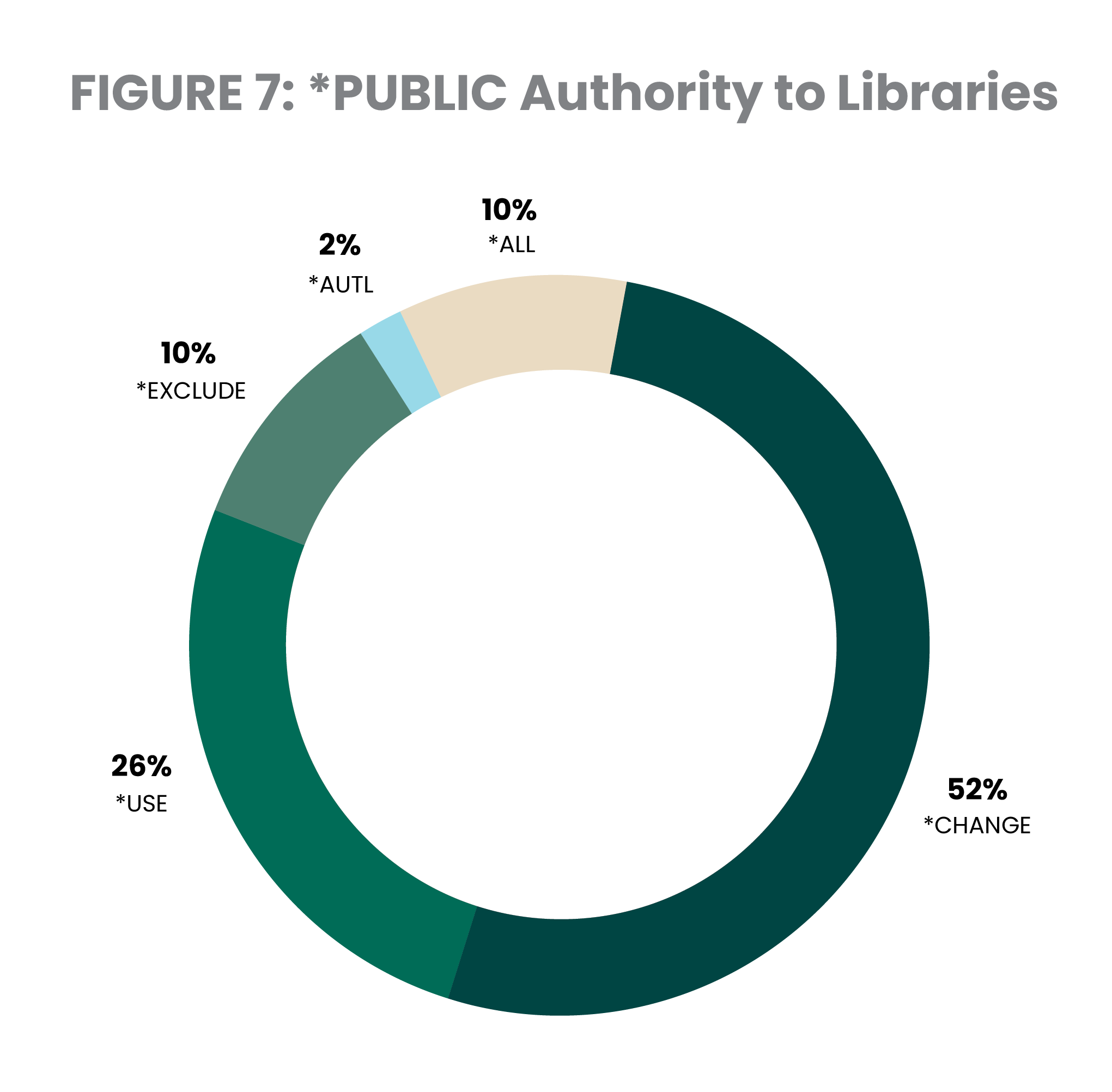
This study uses the *PUBLIC access rights to libraries as a simple measurement indicating how accessible IBM i data is to the average end user. Figure 7 shows the level of access that *PUBLIC has to libraries on the systems in our study.
*USE: *PUBLIC can get a catalog of all objects in that library, and attempt to use or access any object in the library
*CHANGE: *PUBLIC can place new objects in the library and to change some of the library characteristics
*ALL: *PUBLIC can manage, rename, specify security for, or even delete a library (if they have delete authority to the objects in the library)
Our findings demonstrate that IBM i shops still have far too many libraries accessible to the average user – libraries that often include critical corporate information. With virtually every system user having access to data far beyond their demonstrated need, administrators need better processes to control access to IBM i data.
PRO TIP
Where possible, secure data using resource-level security to protect individual application and data objects. When this is not possible or practical, use exit program technology to regulate access to the data.
Ensure that application libraries are secured from general users on the system. Although it requires some planning, consider setting the system value and library values for Default Create Authority to the most restrictive setting (*EXCLUDE). If you’ve uncovered vulnerabilities like misconfigured system or library values and need help implementing fixes, Fortra’s remediation team can step in to execute your plan and strengthen your security architecture.
*PUBLIC Access to New Files and Programs
When new files and programs are created on most systems, the average user automatically has change rights to the vast majority of those new objects. Non-named users (*PUBLIC) have the authority to read, add, change, and delete data from the file. These users can copy data from, or upload data to, the file, and even change some of the object characteristics of the file.
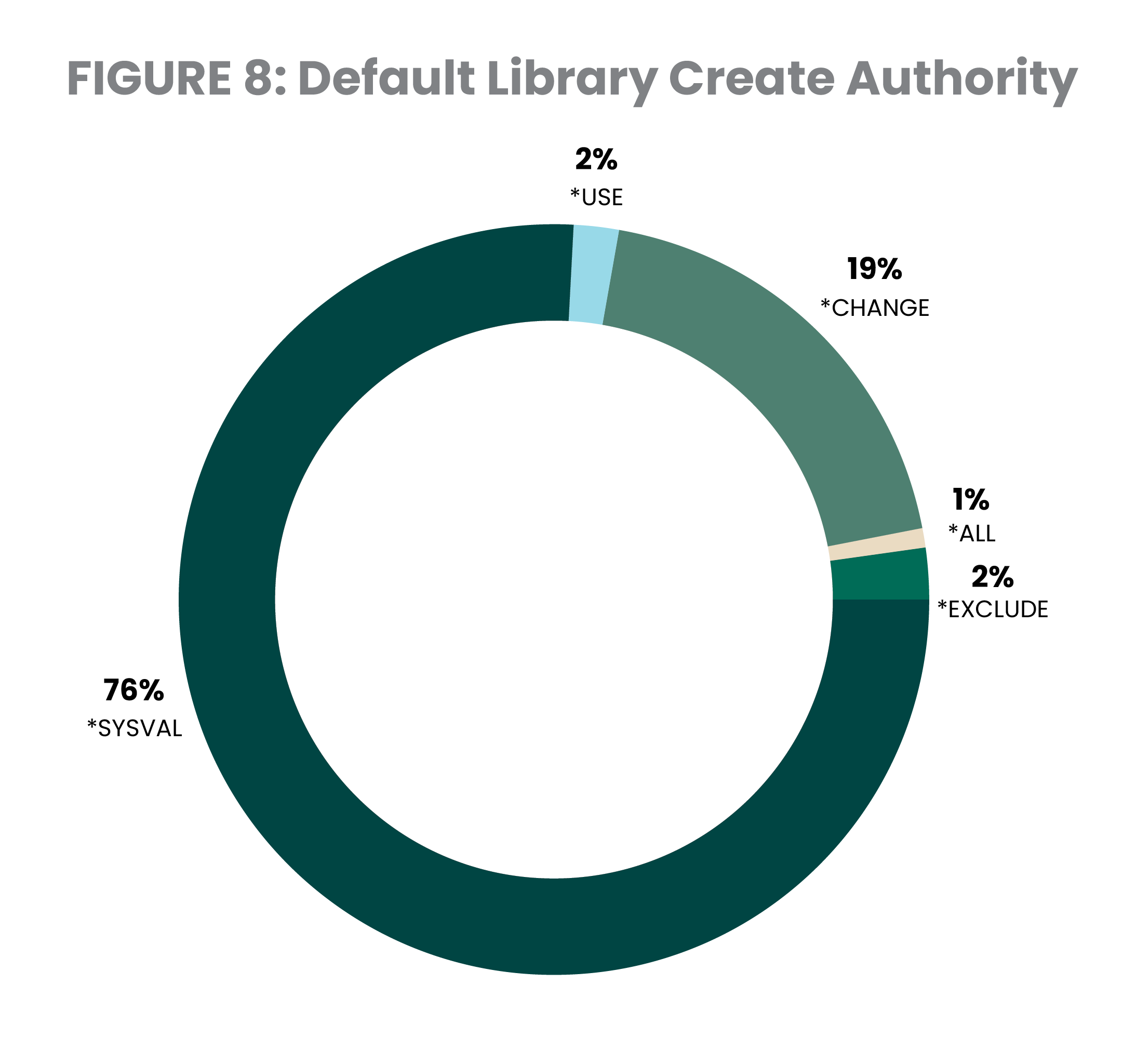
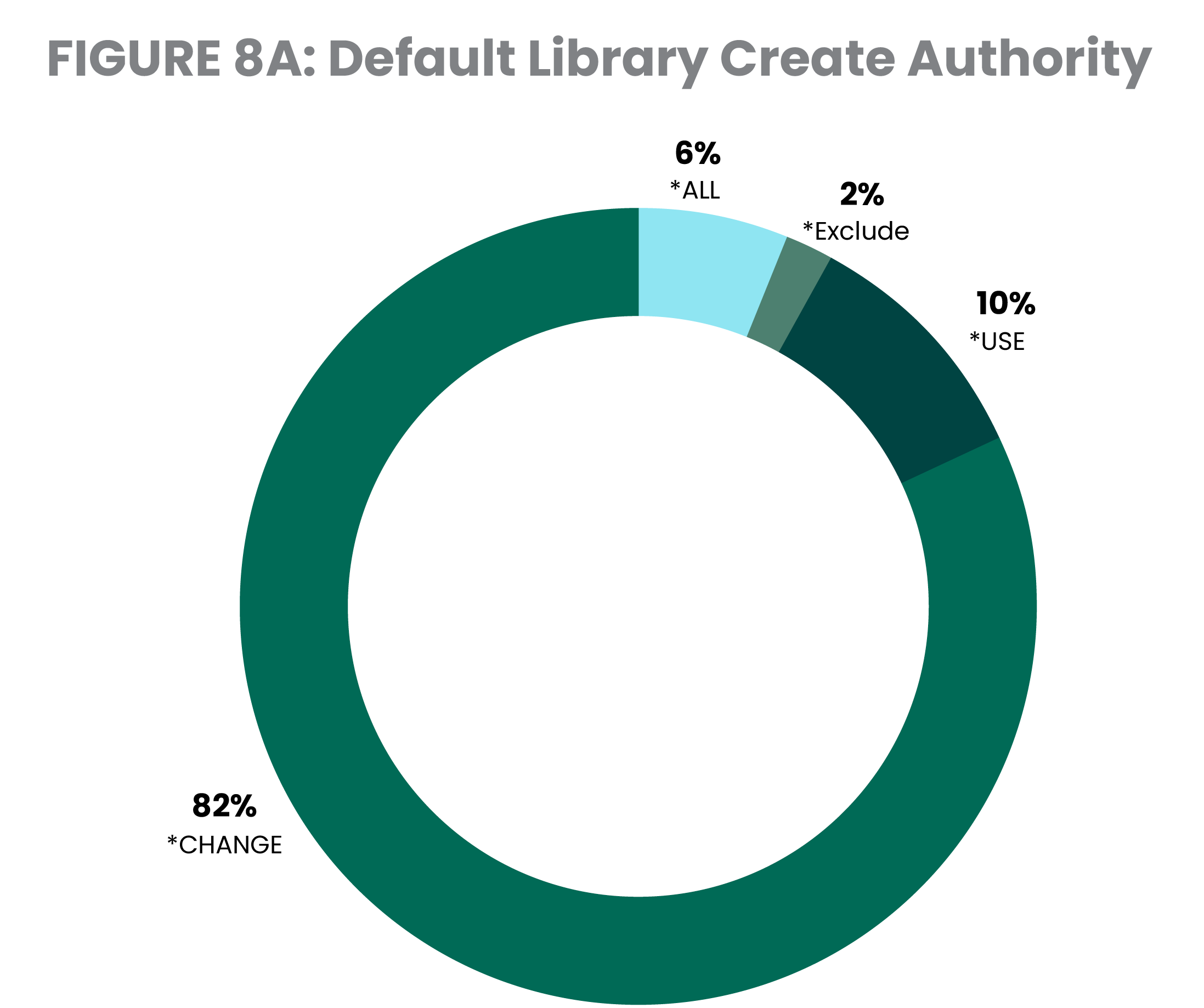
This is because *PUBLIC’s authority to newly created files and programs typically comes from the library’s Default Create Authority (CRTAUT) parameter. Figure 8 shows that 21% of libraries have Default Create Authority set to *USE, *CHANGE, or *ALL. However, 75% of libraries defer the setting to the QCRTAUT system value (*SYSVAL). Figure 8A extends the library level assignment of *SYSVAL and reflects that the system value typically remains at the shipped default of *CHANGE. Just 10% of servers are configured to use the deny-by-default requirement of common regulatory standards such as PCI DSS.
Another issue occurs when a user profile is created with permissions granted to the general user population (*PUBLIC). When *PUBLIC permissions exceed the strongly recommended setting of *EXCLUDE, this is known as an “unsecured profile.” It is possible for an alternate user to run a job that leverages the privileges of the unsecured profile. This activity will not be logged by the operating system as a security violation, since it is deemed permissible at all security levels. Fifty-nine percent of systems have at least one unsecured profile and 10% of systems have 10 or more profiles that are publicly accessible – both of which are improvements from their 2025 marks. It was noted that one system in the 2026 study had over 1000 unsecured profiles, causing great concern as to the integrity of that server. Publicly accessible and unsecured profiles have the potential to create a loophole around a QSECURITY setting of level 40 or 50.
PRO TIP
There’s a clear need to prioritize cybersecurity and implement security tools that provide users with secure, frictionless access to the data they need. Fortra’s Powertech tools can help with that. Be sure to monitor changes to your database information, so you can meet compliance requirements. It is also important to note that IBM ships some IBM i profiles without a value of *PUBLIC *EXCLUDE , and Changing the *PUBLIC authority of these profiles may produce unpredictable results.
Refer to the "IBM-supplied user profiles" section of the IBM Security Reference Guide for the exceptions.
Network Access
Services such as FTP, ODBC, JDBC, and DDM can send IBM i data across the network as soon as the machine is powered on. All end users need is a free tool from the internet or even tools pre-loaded onto a PC. For example, Windows comes with FTP client software that easily sends or retrieves data from an IBM i server.
Some TCP services even permit the execution of server commands. The easily accessed FTP service enables commands like Delete Library (DLTLIB) to be run by all users – even those without command line permission on their profile.
Firewall protection leads some IBM i pros to question whether systems are ever actually accessed in this way. However, the Fortra team witnessed an attack in progress where an intruder had successfully penetrated the perimeter and repeatedly tried to access a client’s system via FTP using several different user profiles, including ADMINISTRA and ROOT.
To reduce this exposure, IBM i provides interfaces known as exit points that allow administrators to secure their systems. An exit program attached to an exit point can monitor and restrict network access to the system. An exit program should have two main functions: to audit access requests and to provide access control that augments IBM i object-level security.
Fortra reviewed 27 different network exit point interfaces on each system to check whether an exit program was registered. Twenty-seven percent of the systems have no exit programs in place to allow them to log and control network access (Figure 9). Although 27% is not ideal, it is a major improvement from 42% last year and 65% just two years ago. Another major improvement exists within the number of systems with full exit point coverage. Just two years ago, only seven percent of systems had all 27 exit points covered. In 2026, this number continued its upward trajectory to 31%. Although the goal is for every system to have complete exit point coverage, we are highly encouraged by this increase in adoption of such a critical security measure and we hope these organizations are ensuring the programs are configured in the manner necessary to provide the additional security they seek.

PRO TIP
At organizations that lack a commercial-grade exit program solution, this tends to be the most highly prioritized remediation item. Without exit programs, IBM i does not provide any audit trail of user activity originating through common network access tools such as FTP and ODBC.
Organizations can write their own exit programs or use software to accomplish this. The advantage of commercial solutions like Powertech Exit Point Manager for IBM i is that you get broader coverage that protects all critical exit points.
Command Line Access
The traditional way to control access to sensitive data and powerful commands was to limit command line access for end users. And in the past, this method was effective.
In addition to configuring the user profile with limited capabilities, application menus controlled how users accessed data and when they had access to a command line. However, as IBM i opens new interfaces that provide access to data and the opportunity to run remote commands, this approach isn’t as sound as it used to be.
Seventy percent of users had their command line access revoked, leaving them unable to run most commands through traditional menu-based interfaces. Twelve percent of users studied were enabled and had command line access, which presents a very clear risk.
Several network interfaces do not acknowledge the command line limitations configured in a user profile and must be controlled in other ways. This means that users can run commands remotely, even when system administrators have taken precautions to restrict them from using a command line.
PRO TIP
Based on the broad *PUBLIC authority demonstrated in earlier sections, many users on these systems have the potential to access data, commands and programs outside of the traditional greenscreen (5250) user interface.
Start addressing this problem by reviewing network data access transactions for inappropriate or dangerous activity. Be sure to establish clear guidelines for file download and file sharing permissions. Remove default DB2 access in tools like Microsoft Excel, IBM i Client Access, and Access Client Solutions.
Security Event Auditing
IBM i can log important security-related events into a tamperproof repository – the Security Audit Journal. This feature allows organizations to determine the source of critical security events, such as “Who deleted this file?” or “Who gave this user *ALLOBJ authority?” This information can make the difference between responding promptly to a security event and discovering a breach after significant damage has occurred. The challenge is that the volume of data contained in the Security Audit Journal is large and the contents are cryptic. Most IT staff have trouble monitoring and making sense of the logged activity.
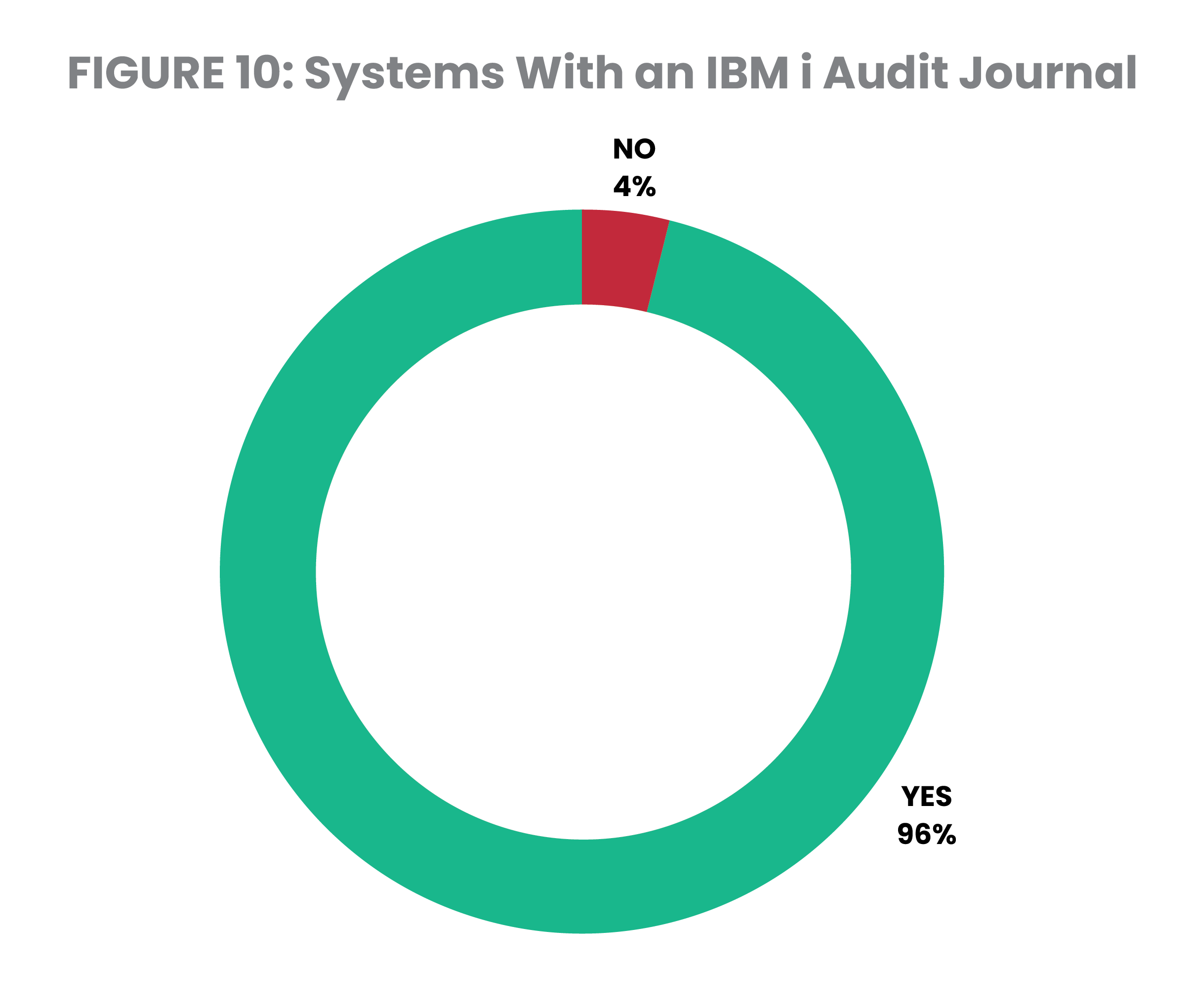
Four percent of the systems reviewed do not have an audit journal repository – similar to the 5% mark achieved in 2025. Meanwhile, 7% of systems –the same as in 2025– are operating with the QAUDCTL system value setting at its shipped value of *NONE (Figure 10). This is the master on/off switch for auditing and globally blocks any system or object level events from being logged, regardless of the existence of the system audit journal. The audit journal exists on seven systems where the QAUDCTL value is set to *NONE. This suggests that administrators fired up the auditing function but subsequently turned it back off or perhaps were unaware of the necessity for additional configuration.
When organizations have activated the Security Audit Journal, it’s unclear how much insight the extensive data is providing them. A few software vendors provide auditing tools that report on and review the system data written to the Security Audit Journal.
PRO TIP
Automating the review of activity collected in the built in IBM i Security Audit Journal will provide insights to both authorized and unauthorized actions against the system and its resources. Auditing tools reduce the costs associated with compliance reporting and increase the likelihood that this work will get done. By combining Powertech Compliance Monitor with Powertech SIEM Agent, organizations gain immediate security alerts alongside comprehensive, easy-to-interpret reporting translating complex security data into clear, actionable information for both technical and audit teams.
Protection from Ransomware, Viruses, and Other Malware
The traditional IBM i library and object infrastructure is considered highly virus-resistant, but other file structures within the Integrated File System (IFS) are susceptible to hosting infected files, which can then be propagated throughout the network. Recognizing this reality, IBM created system values and registry exit points to support native virus scanning.
Results from the 2026 IBM i Marketplace Survey indicate that 27% of IBM i professionals regard ransomware as one of their greatest IBM i cybersecurity challenges. Administrators are also starting to recognize that IBM i contains file systems that are not immune to infection and, under certain circumstances, native applications and even IBM i itself can be impacted.
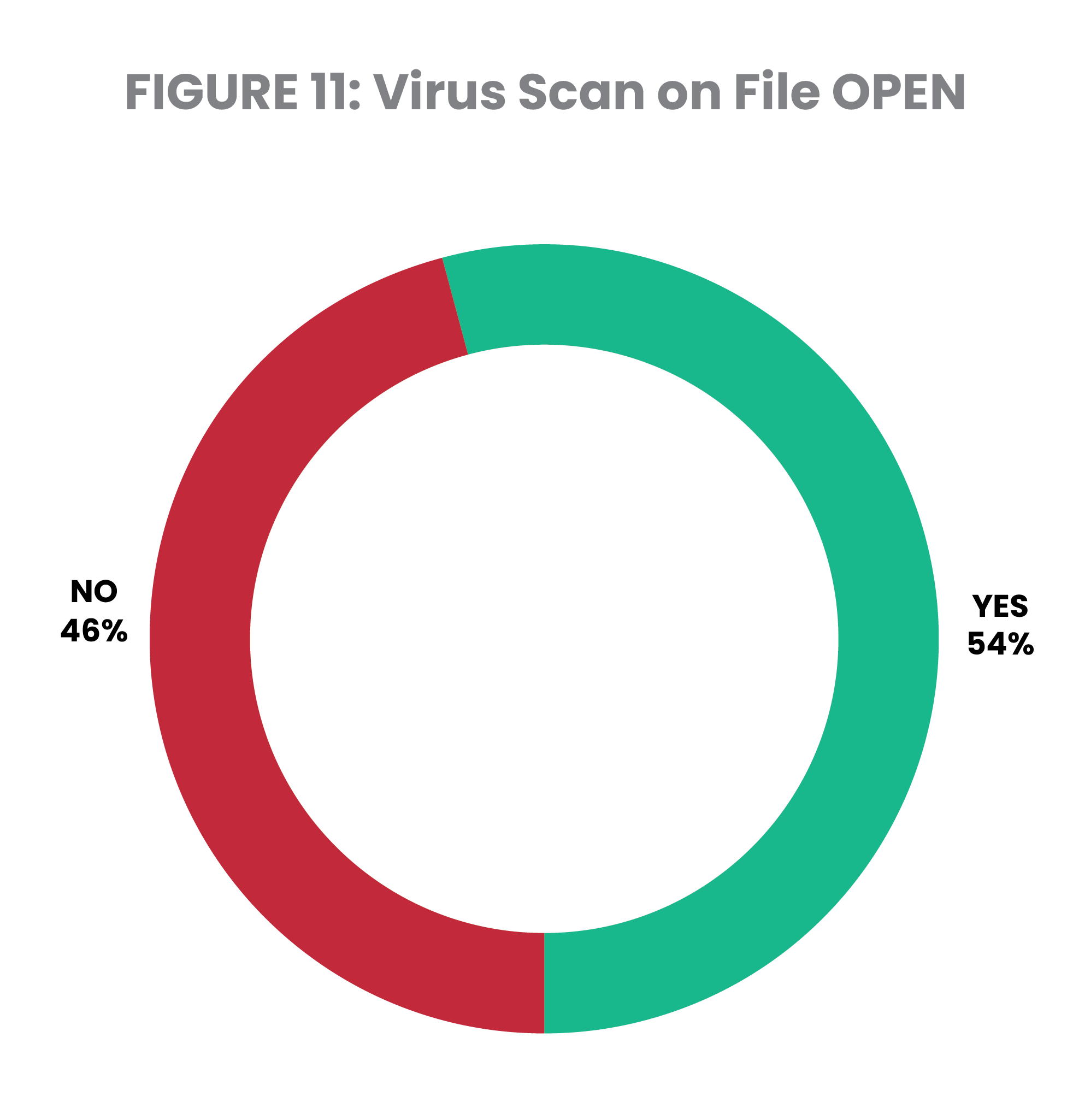
When the servers in this study were reviewed for antivirus controls, 54% had a program for the scan file open exit point. This means they may be scanning for malware, and additional configuration could be required. This means the other 46% are at risk of spreading an infection to another server in their network (Figure 11).
PRO TIP
Register an exit program to exit point QIBM_QP0L_SCAN_OPEN to intercept file open attempts from the network and scan files before they are opened. This prevents viruses from spreading to and from the IBM i environment.
Install an antivirus solution that runs natively on IBM i, such as Powertech Antivirus for IBM i, to detect and remove infections, as well as prevent malware from spreading beyond the current environment.
In addition, utilizing an exit program registered to the QIBM_QPWFS_FILE_SERV exit point can provide visibility to suspicious behavior patterns from viruses operating on other servers in the network connected to the IBM i file system, including ransomware.
Conclusion
IBM i has a reputation as one of the most securable platforms available. One of IBM i’s great advantages is that sophisticated tools for securing, monitoring, and logging are built into the OS. But experts agree that IBM i security is only as effective as the policies, procedures, and configurations put in place to manage it.
This study highlighted a number of common security exposures and configuration management practices that must be addressed to protect the data on IBM i systems. No system became vulnerable overnight, nor is it possible to fix every security problem in a single day. What’s important is starting somewhere and making continued progress toward a stronger security profile. If you’re unsure how to proceed, start with top priorities for IBM i security:
System Security: Check the QSECURITY level and make sure it’s 40 or higher
Security Auditing: Enable QAUDJRN and find a tool to help interpret it
Network Access: Register the most common exit points like FTP and ODBC first
User Permissions: Reduce unnecessary user privileges
The end goal is to achieve comprehensive security coverage. However, administrators can tend to rely too heavily on any one security control. For instance, they may implement password rules but fail to establish a password minimum length. Or they may have their scanning system values set, but not have programs in place to actually perform the scanning.
These controls are designed to work in tandem with each other, which is why it is so important to understand each control’s limitations and the role they play as a part of a larger security framework.
Most experts recommend starting with an assessment of vulnerabilities to understand where your system security stands today and how it can be improved. Security professionals with IBM i expertise and user-friendly software solutions are available to make this project faster and easier. Fortra offers a range of options, from a very thorough Risk Assessment to a quick, no-charge Security Scan.
Once you have all the information, you can begin formulating a plan that addresses your organization’s security vulnerabilities. And from there, security will become business as usual – not a moment of panic after a failed audit or a data breach.
FORTRA IS HERE TO HELP WITH IBM i
Measure your IBM i security against best practices with a Fortra Security Scan. The Security Scan is free, fast, and reveals your system’s security gaps. Our Security Advisers can then help you formulate a plan to remedy your security vulnerabilities.
About the Authors
Sandi Moore has been working with Fortra customers for over 20 years, helping them to effectively address systems monitoring and cybersecurity challenges on IBM i. Organizations throughout the public and private sector rely on Sandi’s expertise, whether they’re looking to proactively protect their systems or improve security controls after a malware attack.
Amy Williams is a Principal Security Services Consultant who joined Fortra in 2015. She holds CISSP, CISA, and PCI-P certifications. Amy first began working on the IBM i platform in 1994 and her experience includes application testing, system installation, system administration, and architecture. She has worked with many customers to remediate identified vulnerabilities.
Our Security Solutions
Fortra is the leading expert in automated security solutions for IBM Power servers, helping users manage today’s compliance regulations and data privacy threats. Our security solutions and services save your valuable IT resources, giving you ongoing protection and peace of mind.
Because IBM Power servers often host sensitive corporate data, organizations need to practice proactive compliance security. As an IBM Advanced Business Partner with an expansive worldwide customer base, Fortra understands corporate vulnerability and the risks associated with data privacy and access control.
Fortra security solutions and services are the corporate standard for IBM i security at many major international financial institutions. Fortra has demonstrated a proven commitment to the security and compliance market and leads the industry in raising awareness of IBM i security issues and solutions, leveraging the experience of some of the world's foremost IBM i security experts.
Fortra Is Here to Help with IBM i Security
Check how secure your IBM i is with a Security Scan from Fortra. Security Scan is free, fast, and reveals your system’s security gaps. Our Security Advisers can then help you formulate a plan to remedy your security vulnerabilities.